
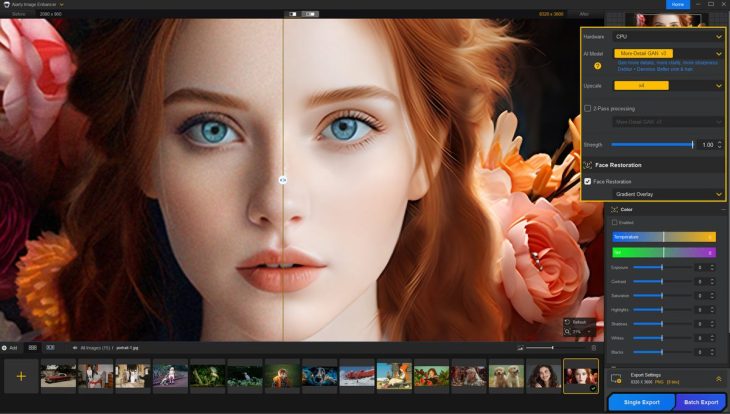
AI upscalers have turned a problem every photographer has — the shot that is slightly soft, noisy or too small to print — into something you can fix in a few seconds. The catch is that the best-known option, Topaz Gigapixel, is now subscription-only at $149 a year. Aiarty Image Enhancer is the main alternative that still sells a lifetime license: it upscales to as much as 32K, removes noise and blur, restores faces in old photos and runs entirely on your own computer. Version 3.14 shipped on September 22, 2026. This review covers what it does well, where it falls short and who should pay for it.
Reviews Universe is reader-supported. When you buy through links on our site, we may earn an affiliate commission at no extra cost to you.
The Short Version
Rating: 8.3/10
Best for: Photographers and hobbyists who want to upscale, denoise and restore photos offline, without a subscription
Price: $59 per year or $109 lifetime (3 PCs and 3 Macs) on Aiarty’s site at the time of writing
Verdict: The best-value AI upscaler for most people. Results are natural and the lifetime license undercuts Topaz by a wide margin, but you need a decent GPU and some patience with the interface.
What Is Aiarty Image Enhancer?
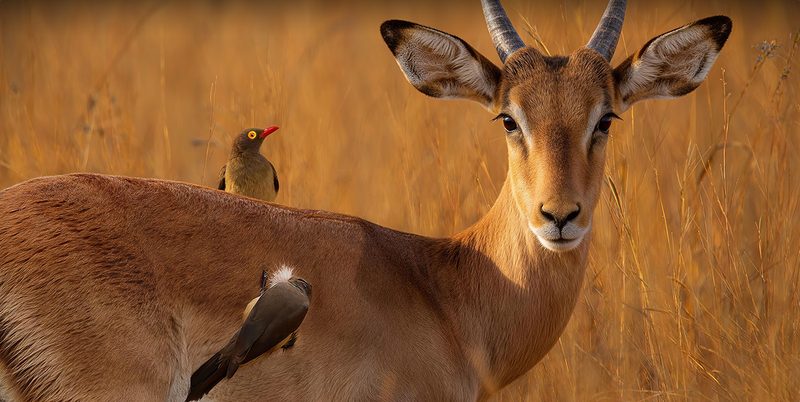
Aiarty Image Enhancer is a desktop app for Windows and macOS made by Digiarty Software, the Chengdu-based company behind WinX DVD Ripper. You drop in a photo, pick an AI model and a scale, and it denoises, deblurs, sharpens and upscales the image in one pass. Scale options run from x1 (clean up without enlarging) through x2, x4 and x8, or you can type a custom resolution. The maximum output is 32,000 pixels on the long side on Windows and 16,000 on a Mac.
Everything is processed locally. Your photos are not uploaded anywhere, and once the models have downloaded on first use the app works without an internet connection. That matters for client work and for anyone who does not want family photos going through a cloud service.
Beyond upscaling, recent versions have added face restoration for old and low-resolution portraits, an AI eraser for removing objects, HDR export to TIFF and DNG, crop and rotate tools, and tighter integration with Lightroom Classic as an external editor.
Aiarty Image Enhancer Specs
| Aiarty Image Enhancer | |
|---|---|
| Current version | V3.14 (September 22, 2026) |
| Platforms | Windows 10/11 (64-bit), macOS 10.15+ (Intel), macOS 11+ (Apple Silicon) |
| Max upscale | 32K on Windows, 16K on Mac; x1, x2, x4, x8 or custom |
| AI models | More-Detail GAN v3, AIGCsmooth v3, Real-Photo (diffusion), Face Restoration |
| Other tools | AI Eraser, HDR export, crop/rotate/flip, text overlay, 2-pass processing |
| Processing | Local and offline; GPU (NVIDIA, AMD, Intel, Apple) or CPU |
| Input formats | JPG, PNG, HEIC, WEBP, TIFF, AVIF, BMP and RAW (DNG, CR3, NEF, ARW, RAF and more) |
| Output formats | JPG, PNG (8/16-bit), TIFF, DNG, AVIF, HEIC |
| RAM | 8 GB minimum, 16 GB+ recommended (Windows) |
| Free version | All features; watermark on export, no batch export |
| Price | $59/year or $109 lifetime |
| Money-back guarantee | 30 days |
The AI Models: Which One to Use
Choosing the right model is the main decision you make in Aiarty, and the names are not self-explanatory, so here is what each one is for:
- More-Detail GAN v3 — adds detail, clarity and sharpness. The default choice for portraits, skin, hair, fabric and textured subjects. Upscales x1 to x8.
- AIGCsmooth v3 — tuned for smooth surfaces: AI-generated art, anime, illustrations and line art, where adding texture would make things worse. Upscales x1 to x8.
- Real-Photo — a diffusion model that rebuilds photorealistic detail in landscapes, product shots and family photos. It gives the most convincing results on real photographs, but it only works at x1 and x2.
- Face Restoration — an optional extra pass that rebuilds faces in blurry, grainy or low-resolution portraits. Since version 3.13 you can set its strength, turn it on or off per face and run it twice.
You can also chain two models with 2-pass processing, for example Real-Photo for a natural base followed by More-Detail GAN to enlarge further. Independent reviewers have found this combination produces the most natural results on landscapes.
Image Quality: Natural Rather Than Over-Processed
The common complaint about AI upscalers is that they invent detail that looks painted or plastic. Aiarty’s strength, according to the photographers who have reviewed it, is that it keeps results looking like photographs. A landscape photographer writing for Fstoppers called it the most natural AI upscaler he had tested and found that around 80% of roughly 50 test images needed no further cleanup, though results got weaker as he pushed towards 3x. A head-to-head test by iPhotography rated it the best of three upscalers at 2x, with the difference against Topaz Gigapixel visible mainly when zoomed in or printed large. Both reviewers received licenses from Aiarty, so treat these as informed opinions rather than lab tests.
It is not magic. At 100% zoom the very finest detail can look artificial, the different models sometimes produce similar results, and no AI can recover information that was never captured — a badly out-of-focus photo will come back sharper but not truly in focus. For noise reduction on high-ISO shots and moderate enlargements for print, it is very effective.
Restoring Old Family Photos
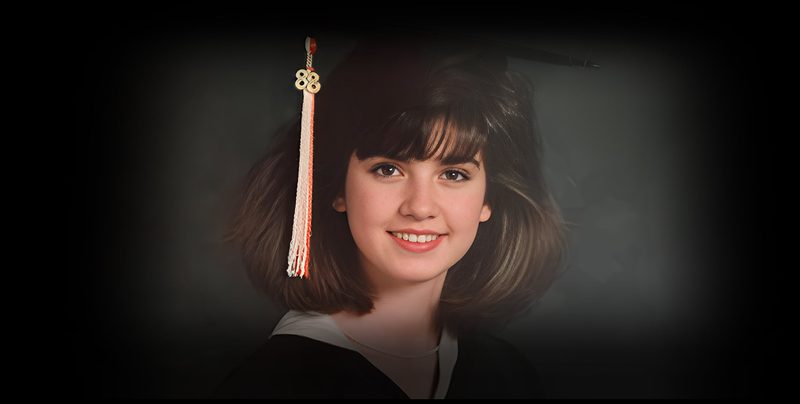
Face restoration is the feature most people will notice first. Scan an old print, run it through Real-Photo or More-Detail GAN with Face Restoration turned on, and blurry faces come back with defined eyes, mouths and hair. Version 3.9 added a model designed specifically for low-resolution and old portraits, and version 3.13 added controls for strength and per-face selection, so you can stop it from over-smoothing a face that only needed a light touch.
As with any face restoration tool, check the result: on very damaged photos the AI is guessing, and the restored face may not look exactly like the person. For moderately soft or grainy prints, the results are excellent.
Batch Processing, RAW Files and Lightroom
The paid version processes whole folders at once, and Aiarty claims up to 3,000 images an hour on suitable hardware. It reads RAW files from all major camera brands, exports 16-bit PNG, TIFF and DNG, and can write HDR output. The last three updates have focused on Lightroom Classic: the app can now be set up as an external editor automatically, imports images while it is still processing, and shows the camera’s EXIF and shooting settings in the preview.
That makes it practical for photographers who want to send a batch of high-ISO event shots or images for large prints through Aiarty without leaving their usual workflow.
Speed and Hardware Requirements
Because everything runs locally, speed depends entirely on your computer. With a mid-range graphics card such as a GTX 1660, reviewers report one to two seconds per photo at 2x. On older laptops with integrated graphics, or when running on the CPU alone, large upscales can take many minutes per image — one trial user reported a 2x job taking over an hour.
On Windows you need a 64-bit system with Windows 10 version 1809 or later and at least 8 GB of RAM (16 GB recommended). GPU acceleration works with NVIDIA cards from the GTX 900 series up, AMD Radeon R9 390 or newer, and Intel graphics from 4th-generation Core. On a Mac, Apple Silicon models from M1 to M5 are supported with Core ML acceleration on macOS 12 or later. Download the free version and run a few of your own photos through it before buying — it is the only reliable way to know how fast it will be on your machine.
Pricing and Free Version
The free version includes every feature, with no sign-up, credit card or image size limit. The two restrictions are that exported images carry a watermark and batch export is disabled. That is enough to judge quality and speed on your own photos.
| Standard (1 year) | Lifetime | |
|---|---|---|
| Price on Aiarty’s site | $59 (list $85) | $109 (list $155) |
| Billing | Yearly, auto-renews, cancel anytime | One-time payment |
| Devices | 1 PC and 1 Mac | 3 PCs and 3 Macs |
| Updates | Free for 1 year | Free for life |
| Commercial use | Included | Included |
| Money-back guarantee | 30 days | 30 days |
The lifetime license is the obvious choice: it costs less than two years of the standard plan and covers six computers. Aiarty also sells lifetime bundles, including Image Enhancer plus Aiarty Video Enhancer for $199. Prices on Aiarty’s site change with promotions, so check the current price on the buy page before you order.
Aiarty vs Topaz Gigapixel
Topaz Gigapixel is the best-known AI upscaler, and the comparison comes down mostly to how you want to pay.
| Aiarty Image Enhancer | Topaz Gigapixel | |
|---|---|---|
| Price | $59/year or $109 lifetime | $149/year, $19/month (annual) or $29/month |
| Lifetime license | Yes | No |
| Devices | 3 PCs + 3 Macs (lifetime) | Per subscription |
| Max upscale | 32K (Windows), x8 or custom | Up to 6x |
| Processing | Local only | Local plus cloud rendering |
| Commercial use | All plans | Limited on the personal plan |
| Number of models | 4 | 10+ |
Topaz offers more models, cloud rendering for slower computers and a longer track record with professionals. Aiarty costs less than one year of Gigapixel for a lifetime license and, by the accounts of photographers who have tried both, produces comparable or more natural results at moderate scales. Unless you specifically need Topaz’s specialist models or cloud processing, Aiarty is the better value.
Pros and Cons
Pros
- Natural-looking upscales that avoid the painted AI look
- Upscales to 32K on Windows, with x1 to x8 or custom sizes
- Excellent face restoration for old and low-resolution portraits
- Runs fully offline; photos never leave your computer
- Lifetime license for $109 covers 3 PCs and 3 Macs
- Reads RAW files and exports 16-bit TIFF, PNG and DNG
- Lightroom Classic integration as an external editor
- Free version with every feature for testing
Cons
- Needs a reasonably modern GPU for fast results
- Model names and interface take time to learn
- Real-Photo, the most realistic model, only goes to 2x
- Fewer models than Topaz Gigapixel
- Free exports are watermarked
- Mac version tops out at 16K
Who Should Buy Aiarty Image Enhancer
Buy it if you want an AI upscaler without a subscription. The $109 lifetime license is the clearest reason to choose Aiarty over Topaz.
Buy it if you restore old family photos. Face restoration on scanned prints is where the improvement is most dramatic.
Buy it if you shoot at high ISO or need to print large. Denoising event and wildlife shots and enlarging images for prints are its best everyday uses.
Buy it if you work with AI art or illustrations. The AIGCsmooth model is built to upscale them without adding unwanted texture.
Skip it if your computer has no dedicated graphics. It will work, but slowly. Try the free version first.
Skip it if you need cloud processing or Topaz’s specialist models. Gigapixel is the more complete professional tool, at a higher ongoing cost.
If you are interested in AI image tools more broadly, see our guide to the best free AI image generators.
Frequently Asked Questions
Is Aiarty Image Enhancer free?
There is a free version with every feature and no image size limit, but exported images carry a watermark and batch export is disabled. To remove the watermark you need a paid license: $59 per year or $109 for a lifetime license on Aiarty’s site at the time of writing.
Does Aiarty Image Enhancer work offline?
Yes. All processing happens on your computer and photos are not uploaded. The AI models download the first time you use them; after that the app works without an internet connection.
How much can Aiarty upscale an image?
Up to 32,000 pixels on the long side on Windows and 16,000 pixels on macOS. You can choose x1, x2, x4 or x8, or enter a custom resolution. The Real-Photo model is limited to x1 and x2.
Is Aiarty better than Topaz Gigapixel?
For most people it is better value: Aiarty sells a $109 lifetime license while Gigapixel costs $149 per year. Photographers who have compared them found Aiarty’s results comparable or more natural at moderate scales. Topaz has more models and cloud rendering, which may matter for professionals or for computers without a good GPU.
What are the system requirements for Aiarty Image Enhancer?
On Windows: 64-bit Windows 10 version 1809 or later, 8 GB of RAM (16 GB recommended) and, for GPU acceleration, an NVIDIA GTX 900-series, AMD Radeon R9 390 or Intel 4th-generation graphics or newer. On Mac: macOS 10.15 or later on Intel, or macOS 11 or later on Apple Silicon M1 to M5.
Who makes Aiarty Image Enhancer?
Digiarty Software, Inc., a software company based in Chengdu, China. Digiarty also makes WinX DVD Ripper and Aiarty Video Enhancer.
Final Verdict
Aiarty Image Enhancer is the best-value AI upscaler you can buy outright. It produces natural results, handles noise and old photos particularly well, runs entirely offline and costs $109 once rather than $149 every year. The interface takes some getting used to and you need a decent graphics card for it to be quick, but neither is a reason to look elsewhere if you are tired of subscriptions.
Rated 8.3 out of 10. Start with the free version on a few of your own photos; if the results and speed suit you, the lifetime license is the one to buy.