
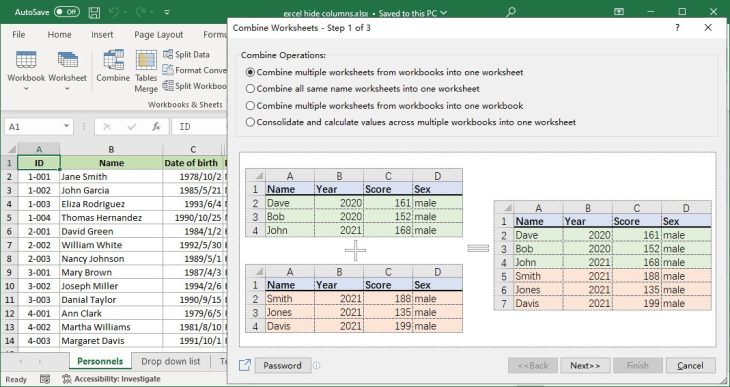
Excel can do almost anything, but a surprising number of everyday jobs still take a formula you have to look up, a macro you have to write or ten minutes of copying and pasting: combining a folder of workbooks into one sheet, splitting a list into separate tabs by region, merging cells without losing their contents, finding duplicates across two columns. Kutools for Excel turns jobs like these into a button. It is an add-in from ExtendOffice that adds more than 300 tools to Excel’s ribbon for a one-time $59. The latest version, 36.00, came out in August 2026. Here is what it is good at, where it falls short and whether it is worth the money.
Reviews Universe is reader-supported. When you buy through links on our site, we may earn an affiliate commission at no extra cost to you.
The Short Version
Rating: 8.2/10
Best for: Windows users who spend hours a week in Excel cleaning, combining and reshaping data
Price: $59 one-time for 2 computers, with 2 years of free updates
Verdict: One of the best $59 investments a heavy Excel user can make. The sheer number of tools is overwhelming at first, it is Windows-only and updates stop after two years, but the time it saves on repetitive work pays for it quickly.
What Is Kutools for Excel?
Kutools for Excel is an add-in that installs into desktop Excel on Windows and adds two ribbon tabs, Kutools and Kutools Plus, packed with more than 300 features. ExtendOffice, the Singapore-based company behind it, has been making it since 2009 and says it has more than 500,000 users.
The tools are grouped into view and navigation, ranges and cells, editing, formulas, workbooks and sheets, security, mail merge, and filtering and statistics. A newer Kutools AI section can generate and explain formulas, analyze data and translate text from inside Excel; if your organization does not allow AI tools, ExtendOffice offers a separate installer without the AI features.
Nothing Kutools does is impossible in plain Excel. The point is that it replaces formulas, Power Query steps and VBA macros with a dialog box, so tasks that used to take minutes of setup take a few clicks.
Kutools for Excel Specs
| Kutools for Excel | |
|---|---|
| Current version | 36.00 (August 7, 2026) |
| Features | 300+ tools, plus Kutools AI |
| Excel versions | Excel 2007 to 2024 and Microsoft 365 (32- and 64-bit) |
| Windows | Windows 7 to 11, Windows Server 2008 to 2025, Citrix |
| Mac | Not supported |
| Languages | 44 |
| Price | $59 one-time |
| Computers per license | 2 (same user) |
| Free updates | 2 years |
| Free trial | 30 days, full features |
| Money-back guarantee | 60 days |
The Features Worth Paying For
With more than 300 tools, most people will use a dozen regularly. These are the ones that save the most time:
- Combine — merges sheets from several workbooks, or CSV files, into one workbook or a single sheet, and can consolidate same-named sheets. This alone replaces a common VBA macro.
- Split Data — splits a table into separate sheets by the value in a column (one sheet per region or salesperson) or by a fixed number of rows.
- Split Workbook — saves every sheet as its own Excel, CSV, TXT or PDF file.
- Super Filter — builds complex filters with multiple AND/OR conditions that would otherwise need Advanced Filter or a helper column.
- Find Duplicates — finds duplicate rows across one or more columns and lets you select, hide, label or highlight them.
- Merge Cells Without Losing Data — combines rows, columns or cells and keeps all the content, instead of Excel’s merge, which discards everything except the top-left value.
- Navigation Pane — a sidebar listing every open workbook, sheet, column and named range, which makes large workbooks much easier to move around.
- Compare Worksheets — highlights differences between two sheets cell by cell.
- Drop-down list tools — add multi-select, searchable and dependent drop-down lists on top of Excel’s data validation.
- Text Tools and Split Names — remove extra spaces, change case, and split full names into first, middle and last.
- Formula Helper — ready-made formulas for date calculations, lookups and other jobs you would normally search for.
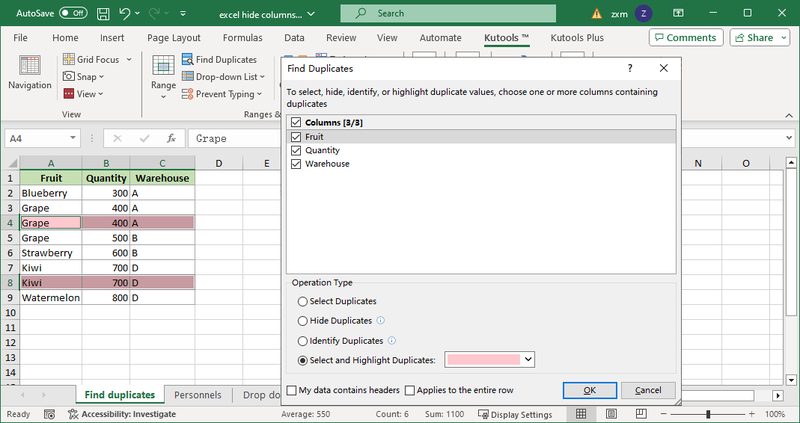
Where It Saves the Most Time: Cleaning and Reshaping Data
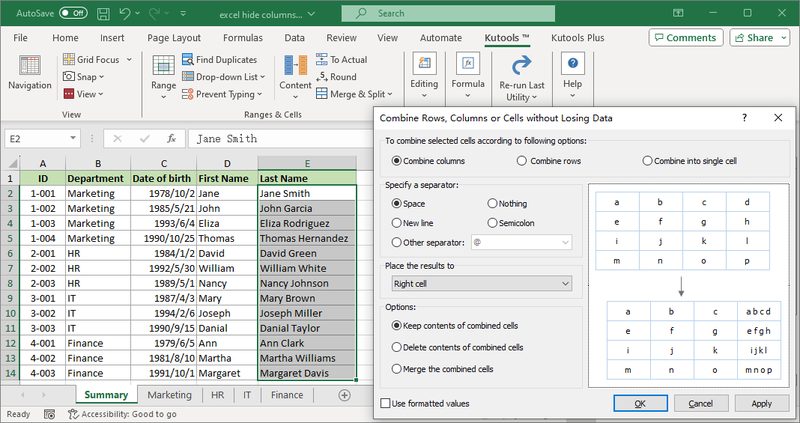
The people who get the most from Kutools are the ones who receive messy data from other people and have to turn it into something usable every week: exports from accounting or CRM systems, monthly files from branch offices, lists with inconsistent spacing and capitalization. Combining 12 monthly workbooks, removing duplicates, splitting names and then breaking the result back out into one sheet per manager is an afternoon of work in plain Excel and a few minutes with Kutools.
Technary, which rated it 4 out of 5, highlighted exactly this: big time savings on data clean-up without needing to write VBA. If your Excel work is mostly building models and dashboards rather than handling data, the benefit is smaller.
Kutools AI
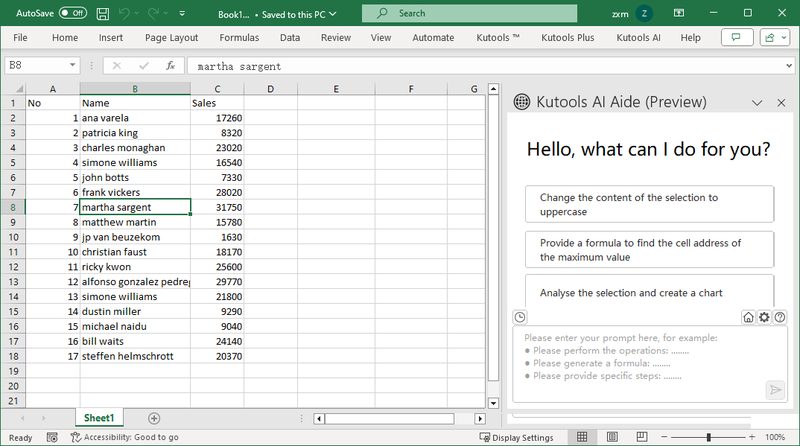
Recent versions add an AI Aide panel that can carry out tasks described in plain language, generate formulas from a description, explain an existing formula, analyze a selected range and translate text. It is convenient, but it is not the main reason to buy Kutools — Microsoft 365 Copilot and free chat assistants cover similar ground. The ready-made tools remain the real value, and the separate no-AI installer is a sensible option for companies with AI policies.
The Drawbacks
It is Windows-only. ExtendOffice states that Kutools is not compatible with macOS, and it does not work in Excel for the web. Mac users need to look elsewhere.
There are too many features to find at first. Hundreds of buttons across two ribbon tabs is overwhelming, and reviewers have said so. The search box and the tutorials on ExtendOffice’s site help, but expect to spend some time learning where things are.
“Lifetime” has a catch. The license never expires, but it includes only two years of free updates and support. After that you can keep using your version indefinitely, but upgrading to a newer version requires a renewal. At least one buyer was surprised to find a newer version falling back to trial mode.
Independent reviews are scarce. ExtendOffice shows a 4.9 rating from thousands of its own customer reviews, but there are few independent ones; on Trustpilot it has a 4.3 from only eight reviews. The 30-day trial and 60-day refund are the best way to judge it for yourself.
Pricing, Trial and Other ExtendOffice Products
Kutools for Excel costs $59 as a one-time purchase on ExtendOffice’s site at the time of writing. The license can be activated on two computers owned by the same user and includes two years of free updates and support. There are volume discounts for businesses, and on Citrix or terminal servers each user needs a license.
The free trial lasts 30 days with every feature unlocked; after that, each feature can be used only three times. ExtendOffice offers a 60-day, no-questions-asked money-back guarantee — twice as long as most software companies.
The same company makes Kutools for Word and Kutools for Outlook and Office Tab ($39), which adds browser-style tabs to Word, Excel and PowerPoint. The Kutools for Office bundle includes all of them plus Kutools for PowerPoint for $129, a good deal if you use more than two.
Kutools vs Ablebits Ultimate Suite
| Kutools for Excel | Ablebits Ultimate Suite | |
|---|---|---|
| Price | $59 (2 computers) | $49 Personal (2 computers); $99 Business (5 computers) |
| Number of tools | 300+ features | 70+ tools (300+ use cases) |
| Excel versions | 2007 to 2024, Microsoft 365 | 2016 to 2024, Microsoft 365 |
| Mac support | No | No (Windows virtualization only) |
| Free updates | 2 years | 2 years |
| Free trial | 30 days | 14 days |
| Money-back guarantee | 60 days | 30 days |
Ablebits is Kutools’ closest rival and is $10 cheaper for a personal license. Ablebits has fewer, more polished tools and a cleaner interface; Kutools has far more features, supports older versions of Excel, and comes with a longer trial and refund period. For most people who want the widest range of shortcuts, Kutools is worth the extra $10.
Pros and Cons
Pros
- 300+ tools that replace formulas, Power Query steps and VBA
- Excellent for combining, splitting and cleaning data
- One-time $59 price, no subscription
- Works with Excel 2007 through 2024 and Microsoft 365
- Optional AI tools, with a no-AI installer for businesses
- 30-day full trial and 60-day money-back guarantee
- Frequent updates, roughly every two to three months
Cons
- Windows only; no Mac or Excel for the web
- So many features that it is hard to find things at first
- Free updates end after two years
- Few independent reviews
- Trial limits each feature to three uses after 30 days
Who Should Buy Kutools for Excel
Buy it if you handle data in Excel every week. Analysts, accountants, administrators and anyone who merges, splits and cleans spreadsheets will recover the $59 in time saved within days.
Buy it if you rely on macros you did not write. Many of the macros people copy from forums — combine workbooks, split by column, merge cells keeping text — are built into Kutools.
Buy the Kutools for Office bundle if you also live in Word and Outlook. $129 covers all of ExtendOffice’s add-ins.
Skip it if you use a Mac or Excel in the browser. It will not run.
Skip it if you use Excel only occasionally. Built-in features and a quick search will cover you.
For more ways to work faster, see our comparison of Notion vs ClickUp.
Frequently Asked Questions
Is Kutools for Excel free?
No, but there is a 30-day free trial with every feature unlocked. After the trial each feature can be used only three times. The full license costs $59 as a one-time purchase.
Is Kutools for Excel a one-time purchase?
Yes. You pay $59 once and can use the software indefinitely on up to two computers. The license includes two years of free updates and support; after that, newer versions require a renewal, but your current version keeps working.
Does Kutools for Excel work on Mac?
No. ExtendOffice states that Kutools for Excel is not compatible with macOS. It works with desktop Excel 2007 to 2024 and Microsoft 365 on Windows 7 to 11.
Is Kutools for Excel safe?
Kutools is a commercial add-in sold by ExtendOffice, a software company registered in Singapore since 2008, and claims more than 500,000 users. Download it only from extendoffice.com. Businesses that restrict AI tools can use the separate installer without the AI features.
Which is better, Kutools or Ablebits?
Kutools costs $59 and Ablebits $49 for a personal license. Kutools has more features, supports Excel 2007 and later, and offers a 30-day trial with a 60-day refund. Ablebits has fewer but more polished tools and needs Excel 2016 or later. For the widest range of tools, Kutools is the better choice.
What is the latest version of Kutools for Excel?
Version 36.00, released on August 7, 2026. ExtendOffice releases a new major version roughly every two to three months.
Final Verdict
Kutools for Excel is one of the best-value add-ins a heavy Excel user can buy. Combining workbooks, splitting data, merging cells and finding duplicates become one-click jobs, and for a one-time $59 it pays for itself after a few saved afternoons. It is Windows-only, the volume of features takes some learning, and “lifetime” means two years of updates, but none of that changes the recommendation.
Rated 8.2 out of 10. Install the 30-day trial, use it on the spreadsheets you actually work with, and you will know quickly whether it belongs on your ribbon.