

When you uninstall a program in Windows, it runs that program’s own uninstaller, and many of them leave things behind: folders in Program Files and AppData, registry entries, scheduled tasks, services and browser extensions. Over time those leftovers add up. Revo Uninstaller and IObit Uninstaller are the two most popular tools for removing software completely. Both run the normal uninstaller, then hunt down what it missed; both remove stubborn programs, Windows apps and browser extensions. They have different strengths, different pricing models and very different reputations. Here is how they compare in 2026.
Reviews Universe is reader-supported. When you buy through links on our site, we may earn an affiliate commission at no extra cost to you.
The Short Version
Choose Revo Uninstaller if you want the most thorough, precise removal, a license that keeps working after the update period, and a vendor without a history of upselling.
Choose IObit Uninstaller if you want the most features for the least money — bloatware removal, a software relocator and an updater — and a free version that does more.
Our pick: Revo Uninstaller Pro. Uninstalling is about trust and precision, and Revo’s install monitoring and backups are the best way to remove software cleanly.
Revo Uninstaller vs IObit Uninstaller at a Glance
| Revo Uninstaller | IObit Uninstaller | |
|---|---|---|
| Developer | VS Revo Group (Ruse, Bulgaria, since 2007) | IObit (Hong Kong-registered company) |
| Latest version | Pro 5.5.4 (Sep 23, 2026); Free 2.7.2 (Oct 6, 2026) | 16.0.0 (Sep 9, 2026) |
| Free version | Yes | Yes |
| Leftover scanning | Yes; extended scanning in Pro | Yes (Powerscan); deep scanning in Pro |
| Forced uninstall | Pro | Listed under Pro (4,000+ stubborn apps) |
| Batch uninstall | Pro | Free |
| Install monitoring | Real-time monitor + logs database (Pro) | Real-time monitoring (Pro) |
| Browser extension removal | Pro | Yes (malicious plugin detection in Pro) |
| Extras | Hunter Mode, 8 cleaning tools | Bloatware remover, software relocator, software updater, file shredder |
| Pro price | $24.95 (1 PC, 1 year of updates) | $14.77/yr (1 PC), $16.77/yr (3 PCs) |
| License after it lapses | Keeps working, no new versions | Subscription |
| Money-back guarantee | 60 days | 60 days |
Revo Uninstaller: Precision and Trust
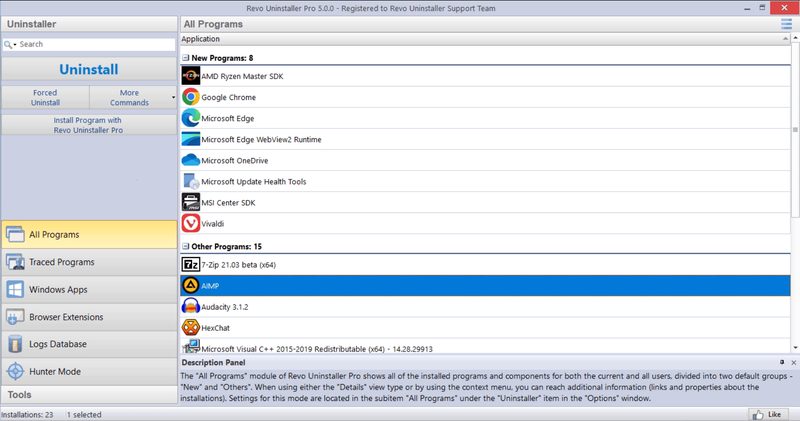
Revo’s approach is careful and transparent. It runs a program’s own uninstaller, then scans for leftover files, folders and registry entries and shows you exactly what it found before deleting anything. Hunter Mode is its signature feature: drag a target onto any window, desktop shortcut or tray icon to uninstall that program or stop it starting with Windows — handy for identifying the mystery icon in your system tray. Both versions remove Microsoft Store apps and include eight cleaning tools, among them an autorun manager, junk file cleaner, browser and Office history cleaners, an evidence remover and unrecoverable file deletion.
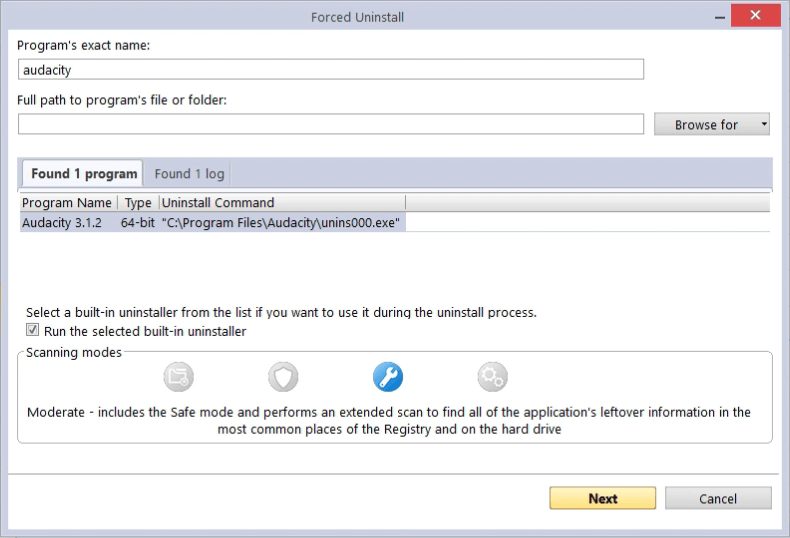
Pro is where Revo pulls ahead. Forced Uninstall removes programs whose uninstaller is broken or missing, or cleans up after a program you uninstalled without Revo. Quick/Multiple Uninstall removes several programs in one queue with a single restore point. The real-time installation monitor records every change a program makes as it installs, so it can later be removed with complete precision, and a logs database built by Revo’s team brings that precision to many popular programs you installed before Revo. Every removal is protected by a multi-level backup: a restore point, a full registry backup, leftover files sent to the Recycle Bin and registry entries saved in Revo’s own backup manager.
Revo Uninstaller Pro costs $24.95 for one PC with a year of updates, or $39.95 for two years; the license keeps working after that, you just stop receiving new versions. There is a 30-day trial and a 60-day money-back guarantee. Pro Portable ($29.95) is licensed per user and runs from a USB stick on unlimited PCs. TechRadar rated Pro Portable 4 out of 5, and Windows Report gave Pro 7.5 out of 10, warning that leftover removal needs care — which is what the backups are for.
Pros
- Most precise removal via real-time install monitoring
- Forced uninstall for broken programs
- Multi-level backups for every removal
- Hunter Mode for tray and startup programs
- License keeps working after updates end
- Portable edition for unlimited PCs
- No cross-selling of other products
Cons
- Batch and forced uninstall are Pro-only
- Pro is pricier than IObit’s
- Fewer extra tools
- Interface is functional rather than modern
IObit Uninstaller: More Tools, Lower Price
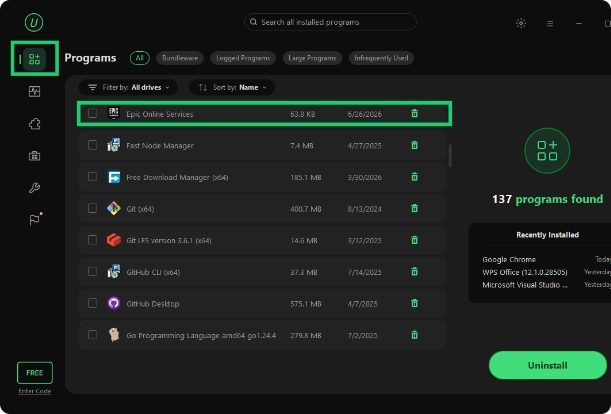
IObit Uninstaller 16, released in September 2026, packs in more than any other uninstaller. Beyond batch uninstalling with Powerscan leftover cleanup, it has a Bloatware Remover for pre-installed Windows apps and system components, a new Software Relocator that moves installed programs to another drive without reinstalling them — useful when C: is full — a Software Health scan, a browser extension manager that rates plugins as trusted, ad-injecting or malicious, a file shredder and a one-click updater for outdated programs. The free version is more capable than Revo’s and includes batch uninstall.
IObit’s own pages are inconsistent about where the free version ends: the free product page promotes forced removal, bundleware detection and extension removal, while the Pro comparison lists forced removal of 4,000-plus stubborn programs, bundled software removal and malicious extension removal as Pro features. Expect the free version to scan and remove, and Pro to unlock the deeper and automatic options, real-time monitoring and premium support.
Pro is cheap: $14.77 a year for one PC or $16.77 for three, with a 60-day money-back guarantee. TechRadar rated IObit Uninstaller 4 out of 5 for being easy to use and comprehensive. The same review noted that the installer tried to install Dashlane, which it called somewhat deceptive for a tool that removes bundled software. That was in 2020, but IObit still promotes its other products heavily, and the company had public disputes with Malwarebytes in 2009 and 2017.
Pros
- Most features of any uninstaller
- Batch uninstall in the free version
- Software Relocator moves apps off a full drive
- Bloatware remover for pre-installed apps
- Very cheap Pro: $16.77/yr for 3 PCs
- 60-day money-back guarantee
Cons
- Upsells other IObit products
- Unclear free vs Pro boundaries
- Past bundled offers in the installer
- Subscription stops working when it lapses
Head to Head
Removal thoroughness: Revo. Both find leftovers, but Revo’s install monitoring and logs database let it remove programs based on a record of what they actually changed, rather than a scan afterwards.
Safety: Revo. Its four layers of backup make any mistake reversible, and it shows you everything before deleting it.
Free version: IObit. Batch uninstalling and more tools in the free tier make IObit Uninstaller Free the better no-cost option.
Extra features: IObit. The Software Relocator, bloatware remover and updater have no equivalent in Revo.
Price: IObit, with a caveat. IObit Pro is cheaper per year, especially for three PCs. Revo costs more up front, but its license keeps working after the update period ends, so it can be cheaper over several years.
Trust and experience: Revo. A small Bulgarian developer that has made one thing well since 2007, without cross-selling, against a company known for upselling and installer offers.
Both prices change with promotions; check Revo’s buy page and IObit’s for the current offer.
Frequently Asked Questions
Is Revo Uninstaller better than IObit Uninstaller?
For thorough, safe removal, yes: Revo’s real-time install monitoring, logs database and multi-level backups make it the more precise tool. IObit Uninstaller has more extra features, including a software relocator and bloatware remover, and a cheaper Pro subscription.
Is Revo Uninstaller free?
There is a free version with leftover scanning, Hunter Mode, Windows app removal and eight cleaning tools. Revo Uninstaller Pro adds forced and batch uninstall, extended scanning, browser extension removal, install monitoring and backups for $24.95 with one year of updates.
Is IObit Uninstaller safe?
IObit Uninstaller is a legitimate, widely used program and TechRadar rated it 4 out of 5. A 2020 review found the installer offering a third-party program, and IObit promotes its other software heavily, so download it from iobit.com and read each installer screen carefully.
Does Revo Uninstaller Pro require a subscription?
Not in the usual sense. You pay for one or two years of updates, and the license keeps working after that period; you simply stop receiving new versions. Renewals are offered at a discount.
Can an uninstaller remove programs that won’t uninstall?
Yes. Revo Uninstaller Pro’s Forced Uninstall and IObit Uninstaller’s forced removal can remove programs whose uninstaller is missing or broken, then clean up the leftovers.
Who makes Revo Uninstaller and IObit Uninstaller?
Revo Uninstaller is made by VS Revo Group, founded in 2007 and based in Ruse, Bulgaria. IObit Uninstaller is made by IObit, whose products are sold through Both Talent International Limited, a company registered in Hong Kong.
Final Verdict
Revo Uninstaller Pro is the better uninstaller. It removes software more precisely, protects every removal with backups and comes from a developer that does not try to sell you anything else. Its license also keeps working after the update period, which offsets the higher price.
IObit Uninstaller is the better deal if you want extras — moving installed programs to another drive, removing Windows bloatware and keeping software updated — for under $17 a year for three PCs. Just be ready to decline the upsells.
For a full Windows maintenance toolkit, see our guide to the best PC optimizer software, and our comparison of Driver Easy vs Driver Booster.