
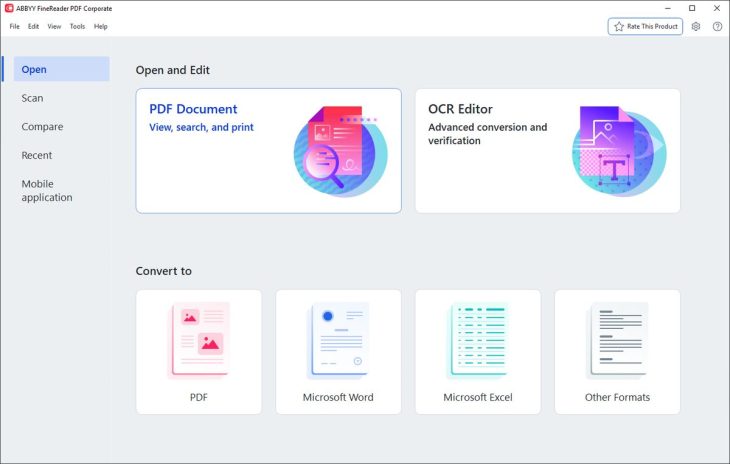
Most PDF editors can read a scanned document. Very few can turn a crooked photocopy of a contract, a printed spreadsheet or a 30-year-old report into an editable Word file or Excel sheet that keeps its layout. That is what ABBYY FineReader PDF is known for: its optical character recognition (OCR) engine reads 198 languages and is the reason many lawyers, accountants and archivists still use it. Around that engine, version 16 adds a full PDF editor with redaction, forms, digital signatures and document comparison, for $99 a year on Windows — well under the $239.88 Adobe charges for Acrobat Pro. Here is how good it is and who should buy it.
Reviews Universe is reader-supported. When you buy through links on our site, we may earn an affiliate commission at no extra cost to you.
The Short Version
Rating: 8.3/10
Best for: Anyone who regularly converts scanned documents, compares contract versions or needs to edit and redact PDFs on Windows
Price: Standard $99/year, Corporate $165/year (Windows); Mac $69/year
Verdict: The best OCR you can buy in a PDF editor, at well under Acrobat Pro’s price. It is subscription-only, the Mac version is much more limited, and its general PDF editing is good rather than great.
What Is ABBYY FineReader PDF?
FineReader PDF is ABBYY’s desktop PDF application for Windows and Mac. ABBYY, a privately held company headquartered in Austin, Texas, has been making FineReader OCR software for more than three decades and says it has over 10 million users. The current Windows version is FineReader PDF 16, which brought a new tabbed interface, a native 64-bit app, a new Organize Pages tool, an improved OCR engine and better image preprocessing for scans.
It combines three things: an OCR engine that turns scans and photos into searchable, editable documents; a converter that exports PDFs to Word, Excel, PowerPoint and a dozen other formats; and a PDF editor for editing text, organizing pages, filling and creating forms, redacting, commenting and signing. It also installs add-ins for Word, Excel, PowerPoint and Outlook.
ABBYY FineReader PDF Specs
| ABBYY FineReader PDF | |
|---|---|
| Current version | FineReader PDF 16 (Windows) |
| Platforms | Windows 11/10 (64-bit); macOS 12 and later |
| OCR languages | 198 (53 with dictionary support) |
| Accuracy claim | Up to 99.8% (ABBYY internal testing) |
| Export formats | Word, Excel, PowerPoint, HTML, RTF, TXT, CSV, ODT, EPUB and more |
| PDF tools | Edit, organize, forms, redact, comment, digital signatures |
| Compare documents | Corporate edition |
| Hot Folder automation | Corporate edition (5,000 pages/month) |
| Price | Standard $99/yr, Corporate $165/yr, Mac $69/yr |
| Free trial | 7 days, 100 pages |
| System requirements | 1 GHz x64 CPU, 2 GB RAM (4 GB recommended), 1.6 GB disk |
OCR and Conversion: The Reason to Buy It
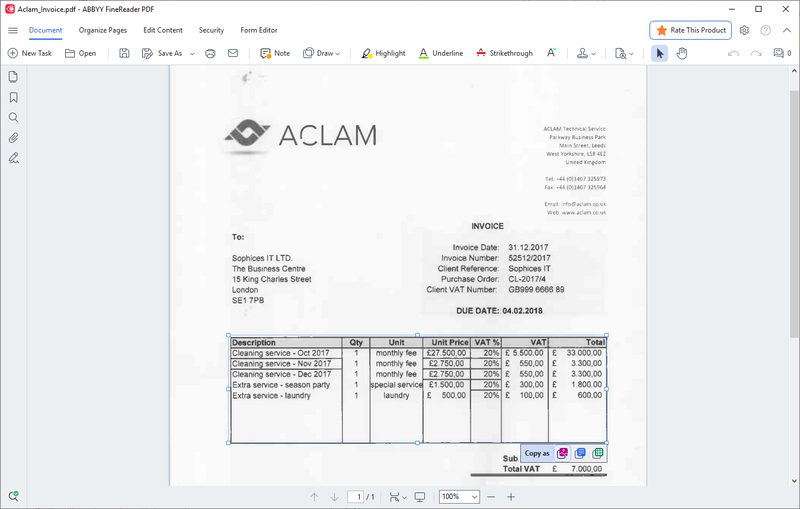
FineReader’s OCR is its standout feature. It recognizes 198 languages in any combination, including mixed-language documents, and keeps the structure of the original: columns, headings, tables, images and fonts come through into Word or Excel far more faithfully than with most PDF editors. ABBYY claims up to 99.8% accuracy in its own testing; independent reviewers are less precise but consistently positive. TechRadar ranks it among the best OCR software of 2026, praising the language support and price, and Macworld called its OCR relatively accurate and reliable.
You can scan directly from TWAIN or WIA scanners, open photos from your phone, or turn any image-only PDF into a searchable one. Batch conversion processes whole folders with the same settings, and the Corporate edition adds Hot Folder automation that watches a folder, FTP location or Outlook mailbox and converts up to 5,000 pages a month on a schedule.
It is not flawless. Users on Capterra, where it averages 4.7 out of 5, most often mention that complex tables do not always convert perfectly to Excel, and large files can be slow. For straightforward scans and typical office documents, though, it is the most dependable converter we know of.
PDF Editing, Forms and Redaction
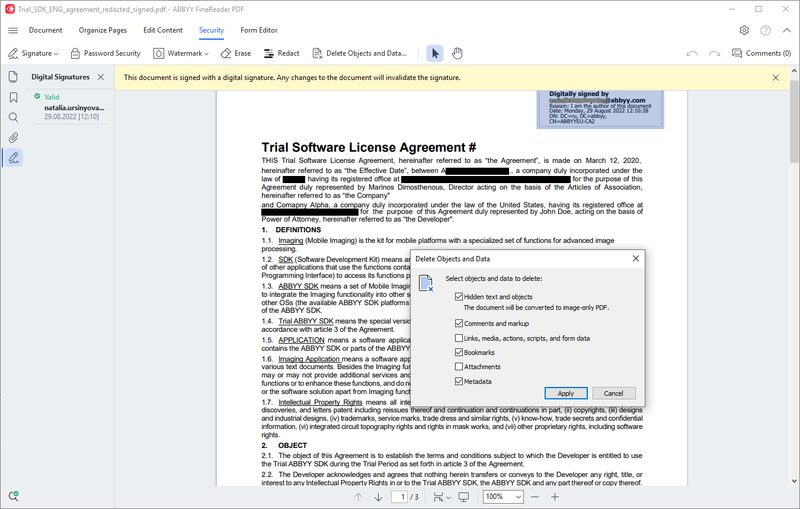
As a PDF editor, FineReader covers the jobs most people need. You can edit text in paragraphs with reflow, edit tables cell by cell, move images, add headers, footers, watermarks, stamps and Bates numbering, and reorganize, split and compress documents. It creates and fills interactive forms with text fields, drop-downs, checkboxes and signature fields, and adds comments and approval workflows for collaboration.
For sensitive documents it can search for and redact keywords or lists of keywords and remove hidden data and metadata in one click. It applies certificate-based digital signatures and validates them. Note that this is not a send-for-signature service like Adobe Sign or DocuSign; it signs documents you hold yourself.
Reviewers find the editing capable but less polished than the OCR. Macworld’s verdict on the Mac version was that similarly priced apps offer better PDF editing, and if editing is your main job rather than conversion, Acrobat remains more refined.
Compare Documents (Corporate)
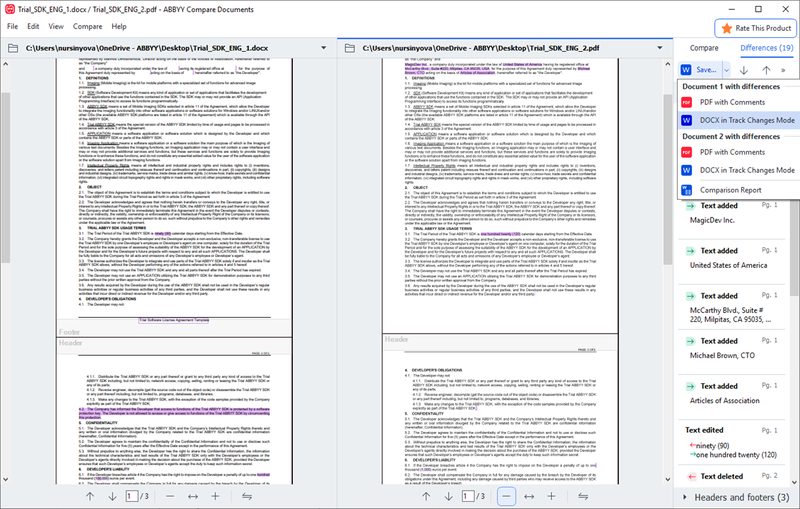
The Corporate edition’s document comparison is one of FineReader’s most useful features for legal and business users. It compares two versions of a document even when they are in different formats — a signed scan against the Word draft, for example — in 40 languages, then highlights every change and can save the result as a marked-up PDF or a Word file with tracked changes. That makes it easy to check that nobody altered a contract between drafts. It is the main reason to pay $66 more a year for Corporate.
Pricing, Editions and Trial
| Standard (Windows) | Corporate (Windows) | Mac | |
|---|---|---|---|
| Yearly | $99 | $165 | $69 |
| 3 years | $267 | $446 | $186 |
| Monthly | $16 | $24 | Not offered |
| OCR and conversion | Yes | Yes | Yes |
| PDF editing, forms, redaction | Yes | Yes | Limited |
| Compare documents | No | Yes | No |
| Hot Folder automation | No | Yes | No |
All plans are subscriptions for one user and renew automatically; there is no perpetual license. The yearly plan is the best value for most people — $99 works out to about $8 a month. The 7-day free trial unlocks the full Corporate edition but caps conversion at 100 pages, which is enough to test it on your own documents; businesses can request a 30-day trial for five users. The Mac version is cheaper but much more limited: it is primarily an OCR and conversion app, without document comparison or Hot Folder automation.
FineReader PDF vs Adobe Acrobat Pro
| FineReader PDF Standard | Adobe Acrobat Pro | |
|---|---|---|
| Price per year | $99 | $239.88 (prepaid) |
| Main strength | OCR and conversion of scans | Editing, signing and sharing |
| Compare documents | Corporate ($165/yr) | Yes |
| PDF editing polish | Good | Best in class |
| E-sign workflows | Digital signatures only | Adobe Acrobat Sign |
| Mac version | Limited | Full |
Acrobat Pro is the more complete and polished PDF suite, with send-for-signature workflows and a full Mac version. FineReader is the better OCR and conversion tool and costs well under half as much. If most of your PDF work involves scans and conversion, FineReader is the smarter buy; if you mainly edit, sign and share PDFs on a Mac, Acrobat fits better.
Pros and Cons
Pros
- Best-in-class OCR with 198 languages
- Keeps tables and layout when converting to Word and Excel
- Full PDF editor with forms, redaction and signatures
- Document comparison across formats (Corporate)
- Hot Folder automation for batch work (Corporate)
- Far cheaper than Acrobat Pro
- Office add-ins for Word, Excel and Outlook
Cons
- Subscription only, no perpetual license
- Mac version is much more limited
- Complex tables don’t always convert perfectly
- Editing is less polished than Acrobat
- Trial limited to 7 days and 100 pages
Who Should Buy ABBYY FineReader PDF
Buy it if you work with scanned documents. Converting scans, faxes and printouts into editable, searchable files is where FineReader is better than anything else at its price.
Buy Corporate if you review contracts or documents. Cross-format comparison and Hot Folder automation justify the extra $66 a year for legal, finance and admin work.
Buy it if you want to leave Acrobat’s price behind. Most people’s PDF needs are covered for $99 a year.
Skip it if you work mainly on a Mac. The Mac edition lacks much of the Windows feature set.
Skip it if you need e-signature workflows. Acrobat or a dedicated e-sign service is the better tool.
If you work in Excel a lot, our Kutools for Excel review covers an add-in that pairs well with converted spreadsheets.
Frequently Asked Questions
How much does ABBYY FineReader PDF cost?
FineReader PDF Standard for Windows costs $99 per year, Corporate $165 per year, and the Mac version $69 per year. Windows plans are also available monthly ($16 and $24) and as three-year subscriptions. Prices were checked on ABBYY’s site in October 2026.
Is there a free version of ABBYY FineReader?
No free version, but there is a 7-day free trial of the full Corporate edition for Windows and Mac, limited to 100 pages of conversion. Businesses can request a 30-day trial for five users.
Is ABBYY FineReader better than Adobe Acrobat?
For OCR and converting scanned documents to Word or Excel, FineReader is generally better and much cheaper ($99 vs $239.88 per year). Acrobat Pro is more polished for editing, has e-signature workflows and a full Mac version.
Can ABBYY FineReader convert PDF to Excel?
Yes. FineReader converts PDFs and scans to XLSX while trying to keep tables intact. It handles most tables well, though users report that very complex tables sometimes need manual cleanup.
Does FineReader PDF work on Mac?
Yes, FineReader PDF for Mac runs on macOS 12 and later for $69 per year, but it is more limited than the Windows version and focuses on OCR and conversion, without document comparison or Hot Folder automation.
Is ABBYY FineReader a one-time purchase?
No. ABBYY now sells FineReader PDF only as a subscription (monthly, yearly or three-year), which renews automatically.
Final Verdict
ABBYY FineReader PDF is the best choice for anyone whose PDF work revolves around scanned documents. Its OCR is outstanding, conversions to Word and Excel keep their layout, and it adds a capable editor with forms, redaction and signatures for well under half the price of Acrobat Pro. The Corporate edition’s document comparison is a genuine time-saver for contract work.
Rated 8.3 out of 10. It is subscription-only and the Mac version lags behind, so Windows users who convert and compare documents get the most out of it. Start with the 7-day trial on your own scans.