

Mechanical keyboards used to require a $200+ investment to get hot-swap switches, gasket mounts, and wireless. Not anymore. In 2026, sub-$100 mechanical keyboards offer hall-effect switches, premium PBT keycaps, and features that high-end models bragged about just two years ago. We tested the best ones to find the standouts.
Reviews Universe is reader-supported. When you buy through links on our site, we may earn an affiliate commission at no extra cost to you.
| Product | Price | Buy |
|---|---|---|
 Redragon K686 HE Best Overall |
$57 | Check Price |
 Keychron C2 Pro Best Full-Size |
$55 | Check Price |
 Corsair K70 CORE Best Premium |
$99 | Check Price |
 Royal Kludge RK61 Best Compact Wireless |
$40 | Check Price |
 Ajazz AK820 Pro Best 75% |
$60 | Check Price |
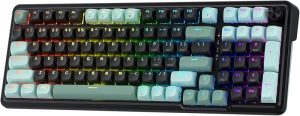
1. Redragon K686 HE — Best Overall ($57)

The Redragon K686 HE is the keyboard that made us rethink what sub-$60 gaming hardware can do. It ships with hall-effect magnetic switches — the same technology found in $200+ Wooting and SteelSeries boards — for adjustable actuation points and rapid trigger response that traditional mechanical switches can’t match.
The 8K polling rate is the headline spec. Every keystroke registers in under 0.125ms, which is genuinely noticeable in competitive FPS games where trigger timing wins duels. The UltraMag POM switches feel smooth and refined out of the box, with a satisfying typing sound that doesn’t need additional lubing.
A dual-module floating design gives the board a premium look, and two layers of noise dampening (foam + silicone) keep typing acoustics clean. At $57, this is the most feature-packed hall-effect keyboard we’ve tested — and it beats boards twice its price on raw performance.
Pros
- Hall-effect magnetic switches with adjustable actuation
- 8K polling rate for competitive gaming
- Rapid trigger support out of the box
- Two-layer noise dampening
- Unbeatable value at $57
Cons
- Wired only (no wireless option)
- Software ecosystem is less polished than Corsair iCUE
- ABS keycaps (not PBT)
- 96% layout takes getting used to if coming from TKL
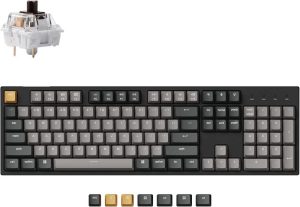
2. Keychron C2 Pro — Best Full-Size ($55)
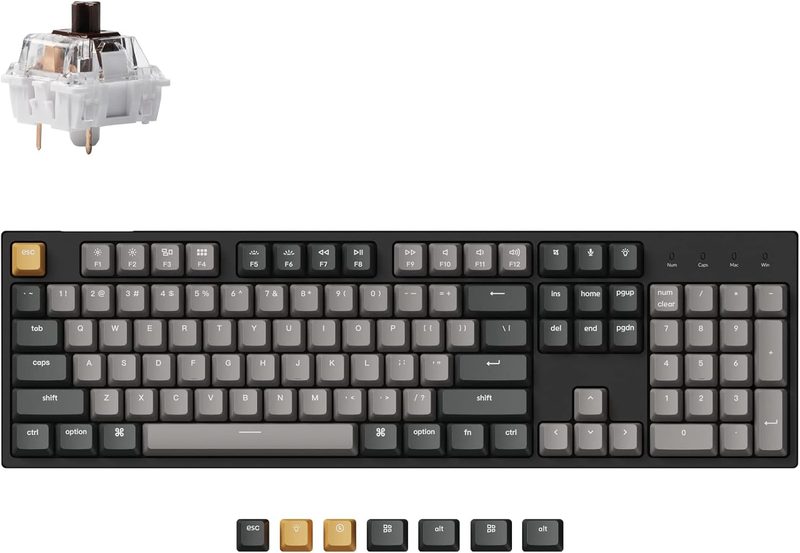
If you need a full-size mechanical keyboard with a numpad and care about build quality, the Keychron C2 Pro is impossible to beat at $55. It’s a QMK/VIA-programmable board with double-shot PBT keycaps, white backlight, and Keychron’s signature feel — everything a productivity user or office gamer needs.
The tactile brown switch version (our pick) offers a satisfying bump without the clicky noise that annoys coworkers. Reds and blues are also available if you prefer linear or clicky feedback. The OEM profile keycaps are comfortable for long typing sessions, and the PBT plastic won’t develop a shine over years of use.
QMK/VIA support is the hidden power feature here. You can remap every key, build custom macros, and create multiple layers of functionality — capabilities typically reserved for $150+ custom boards. For professionals, writers, or coders who live at their keyboards, this is the best $55 you can spend.
Pros
- Full QMK/VIA programmability
- Double-shot PBT keycaps (won’t shine)
- White backlit for clean aesthetic
- Works with Mac, Windows, and Linux
- Available in red, brown, or blue switches
Cons
- Wired only
- White LEDs only (no RGB on this version)
- Plastic case feels less premium than aluminum boards
- No knob or media keys
- Stock stabilizers could be better tuned
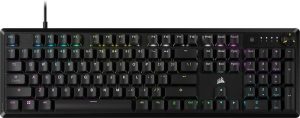
3. Corsair K70 CORE — Best Premium ($99)

The Corsair K70 CORE sits right at the $99 ceiling of our budget, and for that money, it delivers the most polished overall experience on this list. Pre-lubed MLX Red linear switches feel buttery smooth, and the sound dampening foam inside the chassis produces a deep, controlled thock on every keystroke.
Build quality is where Corsair’s experience shows. The aluminum top plate and substantial weight make the board feel planted on your desk. Full per-key RGB lighting is powered by Corsair’s iCUE software, which remains one of the most mature lighting ecosystems in gaming — you can sync the board with other Corsair peripherals, PC fans, and even Philips Hue lights.
The rotary dial and programmable media button are genuinely useful additions that budget boards typically omit. SOCD (simultaneous opposing cardinal directions) support gives competitive FPS players a legitimate edge for counter-strafing. If you want a no-compromises gaming keyboard that still fits under $100, this is the one.
Pros
- Pre-lubed MLX Red switches feel premium
- Aluminum top plate and solid build quality
- iCUE ecosystem integration
- Rotary dial and media controls
- SOCD for competitive FPS gaming
Cons
- $99 is the highest price on this list
- ABS double-shot keycaps (not PBT)
- No wireless or hot-swap on this version
- iCUE can be heavy on system resources
- No additional USB passthrough
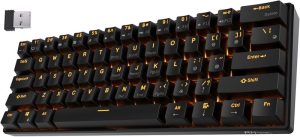
4. Royal Kludge RK61 — Best Compact Wireless ($40)
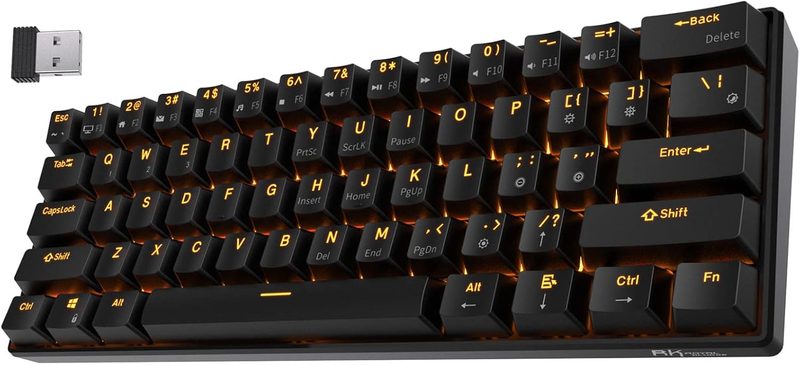
For $40, the Royal Kludge RK61 gives you a triple-mode (Bluetooth 5.0, 2.4GHz, and wired) 60% mechanical keyboard with hot-swappable switches. That’s a combination of features you typically don’t see below $80. It’s the go-to recommendation for anyone wanting to try a compact wireless mechanical without committing $100+.
The 60% layout eliminates the function row, navigation cluster, and numpad, giving you a tiny footprint that frees up desk space for mouse movement. FPS gamers love this because it lets you swing your mouse freely without bumping into the keyboard. All the missing keys are accessible via Fn-layer shortcuts that become second nature within a week.
Hot-swap sockets let you change switches without soldering — perfect for experimenting with different feels or replacing a faulty switch. The blue switch default is clicky and loud, but you can swap in reds, browns, or any 3/5-pin MX-compatible switch in minutes. RGB lighting is standard, and a 1500mAh battery gives you 10+ hours of use over Bluetooth.
Pros
- Triple-mode: BT, 2.4GHz, and wired
- Hot-swappable switches (no soldering)
- Incredibly compact 60% layout
- RGB per-key lighting
- Only $40
Cons
- 1500mAh battery drains with RGB on
- No arrow keys or function row (Fn-layer only)
- Plastic case feels budget
- Stock blue switches are very loud
- Software is basic compared to Corsair/Keychron
5. Ajazz AK820 Pro — Best 75% ($60)
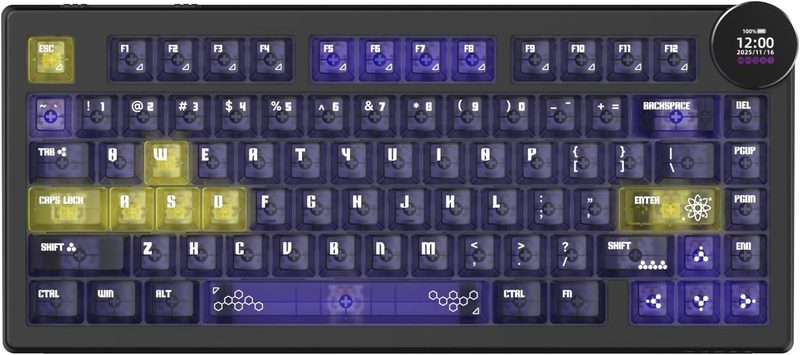
The Ajazz AK820 Pro punches way above its $60 price tag. It’s a wireless 75% board with gasket-mount construction, hot-swappable switches, and a unique color TFT display that doubles as a programmable knob — features typically reserved for custom builds that cost $150+.
Gasket mounting is the big story here. Instead of rigidly bolting the PCB to the case, the AK820 Pro cushions it with silicone gaskets. This produces a slightly flexible typing feel that’s become the gold standard in the custom keyboard community. Combined with the included sound-dampening foam, it delivers a deep, creamy thock that feels like a boutique board.
The TFT screen is both useful and fun. Show battery level, connection status, or custom animations — and the knob below it can be mapped to volume, zoom, or custom shortcuts. Triple connectivity (Bluetooth, 2.4GHz, wired) with a 4000mAh battery means you can leave the cable at home for weeks.
Pros
- Gasket-mount construction at a budget price
- Programmable TFT screen and knob
- Triple-mode wireless (BT, 2.4GHz, wired)
- 4000mAh battery lasts weeks
- Hot-swappable switches included
Cons
- 75% layout omits numpad
- Flying Fish switches are polarizing (swap if you dislike)
- Software can be finicky to set up
- Heavier than other 75% boards (~2.4 lbs)
- Display draws extra battery when active
Side-by-Side Comparison
| Redragon K686 HE | Keychron C2 Pro | Corsair K70 CORE | Royal Kludge RK61 | Ajazz AK820 Pro | |
|---|---|---|---|---|---|
| Price | $57 | $55 | $99 | $40 | $60 |
| Layout | 96% | Full-Size | Full-Size | 60% | 75% |
| Switch Type | Hall Effect | Mechanical | MLX Red (Mechanical) | Mechanical (Hot-Swap) | Mechanical (Hot-Swap) |
| Hot-Swap | No (magnetic) | No | No | Yes | Yes |
| Polling Rate | 8K Hz | 1K Hz | 1K Hz | 1K Hz | 1K Hz |
| Wireless | No | No | No | BT + 2.4GHz | BT + 2.4GHz |
| Keycaps | ABS | PBT | ABS double-shot | ABS | PBT |
| Gasket Mount | No | No | No | No | Yes |
| RGB | Yes | White only | Yes | Yes | Yes |
| Best For | Competitive FPS | Productivity/Typing | Premium gaming | 60% enthusiasts | Custom-feel 75% |
How to Choose the Right Mechanical Keyboard Under $100
Switch Type: Linear, Tactile, Clicky, or Hall-Effect?
Linear switches (like Corsair’s MLX Red) press smoothly without any bump — ideal for fast gaming and quiet typing. Tactile switches (like brown) have a noticeable bump at the actuation point — great for typing accuracy. Clicky switches (blue) add an audible click — satisfying but loud. Hall-effect switches (K686 HE) use magnets instead of metal contacts and let you adjust actuation points per key — the current meta for competitive FPS.
Layout: 60%, 65%, 75%, TKL, or Full-Size?
A full-size keyboard has everything including numpad. TKL (tenkeyless) drops the numpad for a smaller footprint. 75% squeezes all the keys tightly with the function row intact. 65% adds arrow keys but drops the F-row. 60% keeps only the essentials — compact but relies on Fn-layer shortcuts. For most users, 75% is the sweet spot between compactness and usability.
Wireless vs. Wired Tradeoffs
Wireless boards are convenient for multi-device setups but add cost and can have slight latency over Bluetooth. 2.4GHz dongles offer near-wired latency but occupy a USB port. For competitive gaming, a wired connection or 2.4GHz wireless is strongly recommended. Bluetooth is fine for typing and general use.
Hot-Swap: Why It Matters
Hot-swap sockets let you change switches without soldering. This matters for two reasons: experimentation (try different switch types over time) and repair (replace a faulty switch in seconds). If you’re new to mechanical keyboards, hot-swap is highly recommended so you can evolve your typing experience without buying a new board.
Gasket Mount Benefits
Gasket mounting suspends the PCB between silicone gaskets instead of rigidly attaching it to the case. The result is a softer, more uniform typing feel with better acoustics. This used to be a $200+ feature — the Ajazz AK820 Pro brings it down to $60, making it accessible to budget buyers.
Keycap Quality: ABS vs. PBT
ABS keycaps are cheaper but develop a shiny, greasy surface after heavy use. PBT keycaps resist shine and feel more textured. If you plan to keep your keyboard for years, PBT keycaps are worth the small premium. You can also replace ABS keycaps later with aftermarket PBT sets for $30-60.
Software Customization
QMK/VIA (Keychron C2 Pro) offers the most flexibility — you can remap every key, create complex macros, and configure multiple layers. Proprietary software (iCUE, Ajazz Driver) is more polished visually but often less powerful. For power users, QMK/VIA is the gold standard.
Frequently Asked Questions
Hall effect vs traditional mechanical — what’s the difference?
Hall effect switches use magnets and sensors to detect keystrokes, while traditional mechanical switches use physical metal contacts. Hall effect lets you adjust actuation points per key (e.g., deeper for WASD, shallower for spacebar) and supports rapid trigger — where the key resets the instant you start releasing it. This is a significant advantage in competitive FPS games. The tradeoff is slightly higher cost and less switch variety than traditional mechanical.
Are wireless mechanical keyboards good for gaming?
Yes, with caveats. 2.4GHz wireless (like the Royal Kludge RK61 and Ajazz AK820 Pro offer) provides near-wired latency that’s indistinguishable in practice. Bluetooth wireless has slightly higher latency (5-10ms) that doesn’t matter for casual gaming but can be felt in competitive FPS. For competitive gamers, use 2.4GHz or wired. For everyone else, Bluetooth is fine.
What’s hot-swap and why does it matter?
Hot-swap sockets let you replace mechanical switches without soldering. This lets you try different switch types (linear, tactile, clicky) without buying a new keyboard, replace a faulty switch in seconds, or customize your board over time. If you’re new to mechanical keyboards, hot-swap is highly recommended for long-term flexibility.
Which size keyboard should I buy?
If you use a numpad regularly (accounting, data entry), get full-size. If you rarely use the numpad but want all other keys, get TKL. If desk space is tight and you value aesthetics, 75% is the modern sweet spot. If you want maximum portability or are a competitive FPS gamer who needs mouse swing room, 60% is ideal. Try a compact layout before committing — some people never adjust to losing the arrow keys.
How long do mechanical keyboards last?
Most mechanical switches are rated for 50-100 million keystrokes, which translates to 10+ years of heavy daily use. The actual keyboard usually outlasts the switches, and hot-swap boards let you replace worn switches individually. PBT keycaps last essentially forever. Your mechanical keyboard should outlive most of the other hardware on your desk.
The Verdict: Which Mechanical Keyboard Should You Buy?
For most buyers, the Redragon K686 HE is the best mechanical keyboard under $100. At $57, you get hall-effect switches, 8K polling, and rapid trigger — performance features that cost $200+ just last year. For competitive gamers, this is a genuine game-changer at budget prices.
Choose the Keychron C2 Pro if you need a full-size board with PBT keycaps and QMK programmability. The Corsair K70 CORE is the pick for a polished premium experience with iCUE. Get the Royal Kludge RK61 for the cheapest entry into 60% wireless with hot-swap. And the Ajazz AK820 Pro delivers a custom-keyboard feel with gasket mount and a TFT display at just $60.