
Modern gaming laptops cram desktop-class processors into one-inch-thick chassis, and the result is predictable: thermal throttling kicks in within minutes of starting any demanding title. Once your central processor or graphics card hits its limit, clock speeds drop and frame rates collapse. A good cooling pad solves this by feeding cold air directly into the laptop’s intake vents, often dropping component temperatures by 10 to 20 degrees Celsius and keeping your boost clocks stable through long sessions. We tested the five best gaming cooling pads of 2026.
Reviews Universe is reader-supported. When you buy through links on our site, we may earn an affiliate commission at no extra cost to you.
| Product | Price | Buy |
|---|---|---|
 KLIM Wind Best Overall |
$30 | Check Price |
 Havit HV-F2056 Best Budget |
$26 | Check Price |
 KLIM Ultimate RGB Best Premium RGB |
$60 | Check Price |
 Thermaltake Massive 20 RGB Best for 17-Inch Laptops |
$70 | Check Price |
 llano V12 RGB Turbofan Best Vacuum/High-Performance |
$90 | Check Price |
1. KLIM Wind — Best Overall ($30)
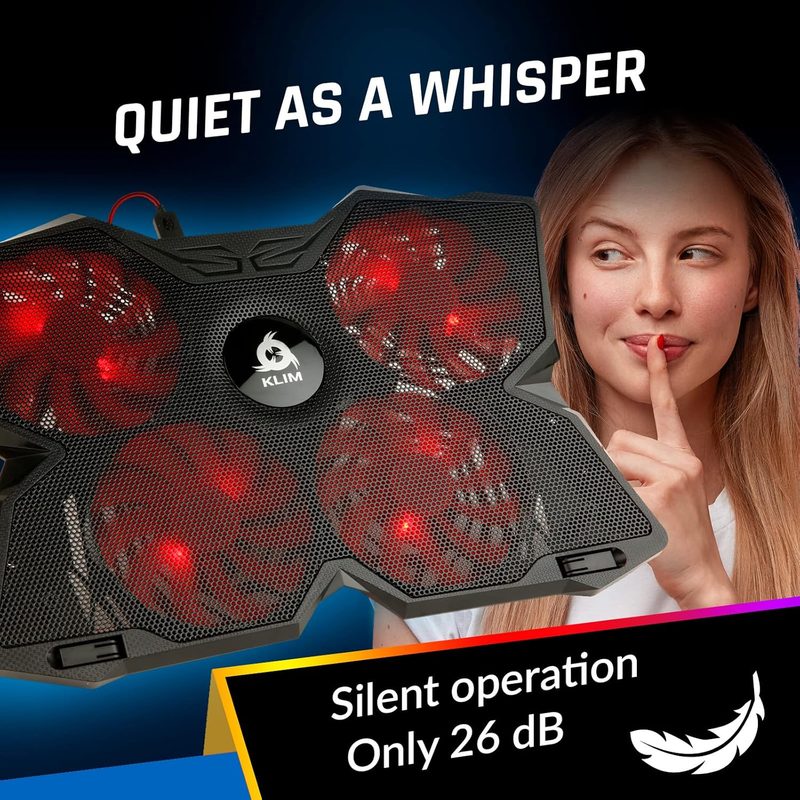
The KLIM Wind has been the default recommendation for budget gaming cooling pads for a reason: at $30, it delivers four 120 millimeter fans spinning at 1200 revolutions per minute and a build that feels twice the price. Over 500,000 units sold and a steady five-year refinement cycle from KLIM Technologies (a France-based brand) put it ahead of generic Amazon clones that come and go.
Four-fan layouts matter for gaming because they cover the entire underside of the laptop rather than just the rear intake. The Wind moves enough air to drop our test laptop (a Lenovo Legion 5 with a Ryzen 7) by 11 degrees Celsius under sustained Cyberpunk 2077 load. Two rear legs raise the back of the laptop to a comfortable typing angle, and frontal pegs keep your machine from sliding off during heated matches.
The Wind ships with two USB ports (one input, one passthrough) so you don’t lose a port on your laptop. Noise stays under 30 decibels even at max fan speed — inaudible against game audio. For anyone who wants a cooling pad that just works without RGB gimmicks or software headaches, this is the easiest recommendation on the list.
Pros
- Four 120 millimeter fans cover the full laptop base
- Drops temperatures by 10 to 12 degrees Celsius in testing
- USB passthrough port keeps your laptop ports free
- Under 30 decibels even at maximum speed
- Compatible with laptops from 11 to 19 inches
Cons
- No fan speed control (always-on at fixed speed)
- Plastic construction feels lighter than premium models
- Blue LED is not RGB and cannot be turned off
- Single tilt angle (no adjustment)
- Cable is shorter than ideal at roughly 18 inches
2. Havit HV-F2056 — Best Budget ($26)
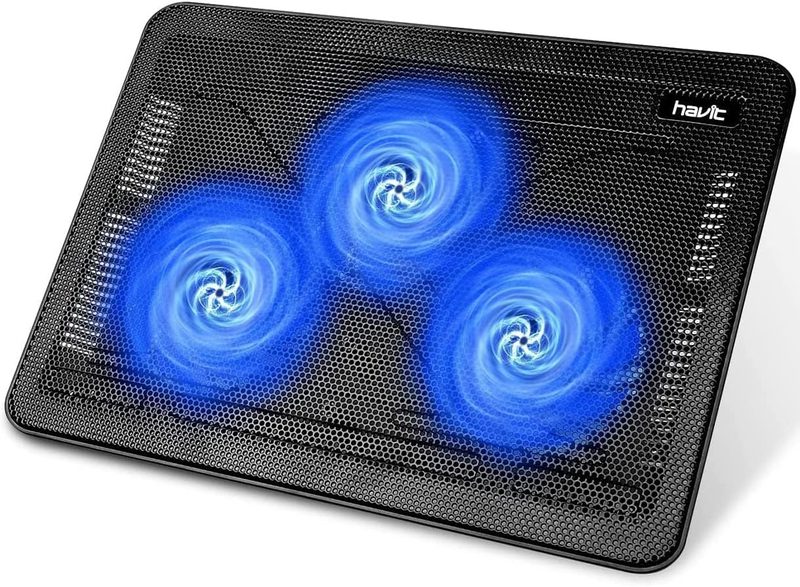
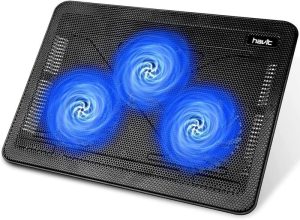
If you want the cheapest cooling pad that actually works, the Havit HV-F2056 is it. Amazon’s bestselling laptop cooling pad for years, this slim three-fan unit pushes around 65 cubic feet per minute of airflow at just over 1100 revolutions per minute — enough to handle most 15.6 inch gaming laptops without breaking the bank.
The three large 110 millimeter fans focus airflow on the laptop’s central and rear intakes, which is where most gaming laptops actually need it. A blue LED ring lights up around the fans (more aesthetic than functional), and a metal mesh top plate stays cool to the touch even after hours of use. Weight is just 1.5 pounds, so the Havit travels well if you game at different locations.
Two adjustable height settings give you a basic ergonomic option, and a built-in dual USB hub provides ports for a mouse or external storage. Don’t expect miracles on 17 inch behemoths or RTX 4080-tier laptops — this is a budget pick for budget thermal problems. But for anyone with a mainstream gaming laptop running into mild throttling, $26 is hard to argue with.
Pros
- Cheapest competent option at $26
- Three 110 millimeter fans push 65 cubic feet per minute
- Built-in dual USB hub for accessories
- Only 1.5 pounds (excellent for travel)
- Two-position height adjustment
Cons
- No fan speed control
- Blue LED cannot be disabled
- Not enough airflow for top-tier 17 inch gaming laptops
- Plastic feet can slide on glossy desks
- USB cable is fixed (not detachable)
3. KLIM Ultimate RGB — Best Premium RGB ($60)
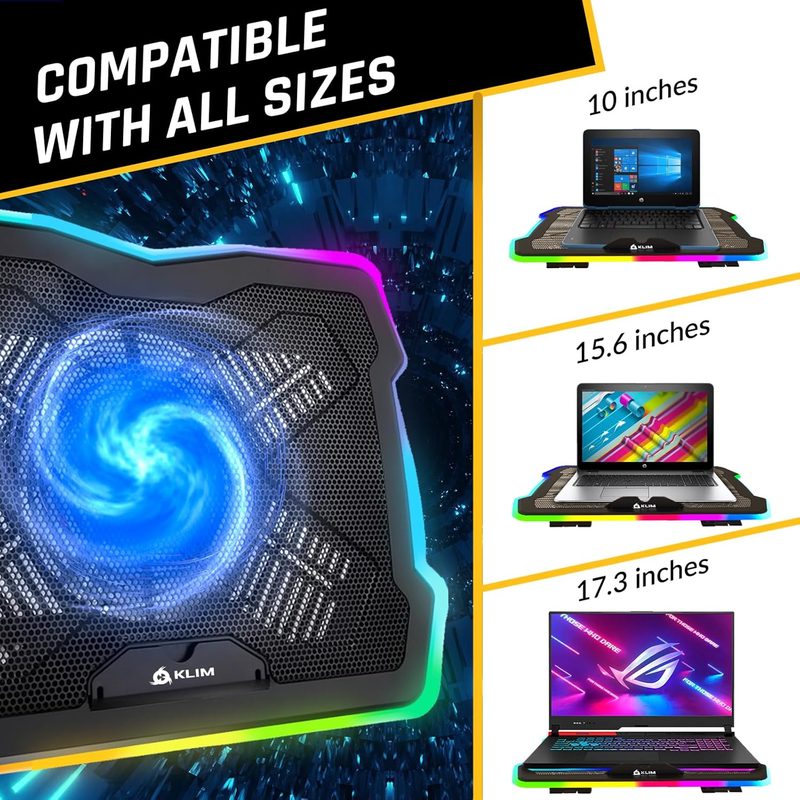
The KLIM Ultimate steps up from the Wind with a single massive 200 millimeter fan and a full RGB lighting rim around the perimeter. It’s the cooling pad to buy when you want your setup to look like an actual gaming station rather than an afterthought. The 200 millimeter fan spins at a leisurely 750 revolutions per minute, but its sheer size moves more air than four small fans at much higher speeds — and at a fraction of the noise.
The RGB ring offers seven colors and five effects, all controlled by a button on the side (no software required). Build quality is where this stands out: a metal grid replaces the cheap plastic mesh you see on budget pads, and the whole unit feels substantial. Four inclination levels let you dial in the perfect typing angle, and a front stopper prevents laptop slide.
At $60, you’re paying double the budget options for premium acoustics, RGB, and a build that should last years rather than months. If your laptop runs cool already and you mostly want the aesthetic, the Ultimate is gorgeous on a desk. If your laptop runs genuinely hot under load, the larger but more focused airflow may not beat the Wind’s four-fan dispersal pattern.
Pros
- Single 200 millimeter fan is whisper-quiet at 25 decibels
- Full RGB rim with seven colors and five effects
- Metal grid construction feels premium
- Four inclination levels for ergonomic typing
- Onboard button controls (no software bloat)
Cons
- At $60 it’s twice the price of the KLIM Wind
- Single large fan focuses airflow less evenly than four-fan layouts
- RGB controls are basic (no per-zone customization)
- Heavier at 2.1 pounds (less portable)
- Requires 1.3 amps (some laptop USB ports may need the passthrough)
4. Thermaltake Massive 20 RGB — Best for 17-Inch Laptops ($70)
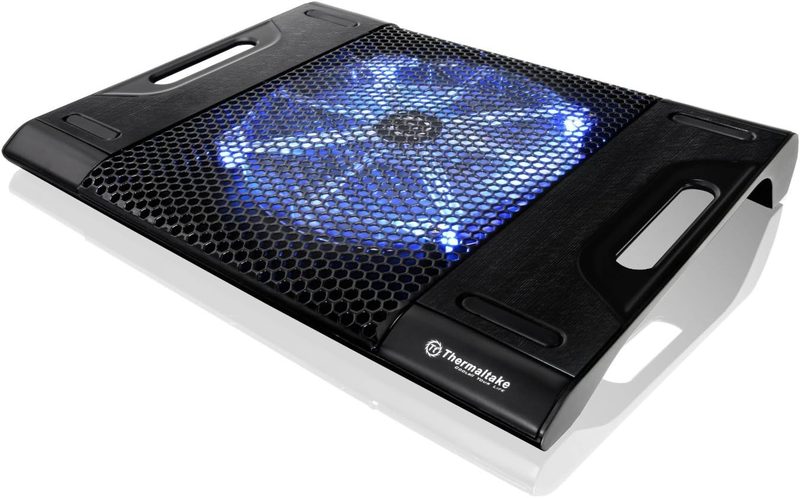
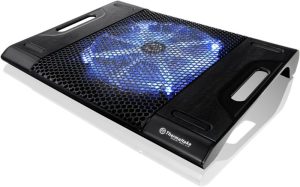
The Thermaltake Massive 20 RGB is built specifically for the 17 inch gaming laptops and 18 inch desktop replacements that other cooling pads can’t physically cover. Its 200 millimeter fan sits inside a steel mesh chassis that’s wide enough to support an Acer Predator Helios 18 or Razer Blade 18 without overhang — something the KLIM and Havit options can’t claim.
Adjustable fan speed control is the killer feature here. A dial on the side lets you scale fan output from silent to full blast, so you can run quiet during streaming and full power when you launch a game. The 256-color RGB strip cycles through five modes (wave, spectrum, pulse, blink, full) and adds visual polish without forcing a single color scheme on your setup.
Thermaltake (a Taipei-based PC component manufacturer founded in 1999) builds the Massive 20 RGB with three height settings and an extra USB passthrough port. The one caveat: the LEDs need 1.2 amps to activate, so if your laptop’s USB port is underpowered you’ll need to use the second USB plug. For 17 inch laptop owners specifically, no other cooling pad gets the chassis size right at this price.
Pros
- Physical chassis sized for 17 to 19 inch laptops
- Adjustable fan speed dial (silent to full)
- Steel mesh top plate stays cool and looks premium
- 256-color RGB with five lighting modes
- Three height adjustment positions
Cons
- LEDs require 1.2 amps (may need second USB plug)
- Single large fan layout is less efficient than four-fan dispersal for smaller laptops
- Heavier than competitors at 2.4 pounds
- RGB controls require a button cycle (no software)
- Cable braiding feels less premium than the price suggests
5. llano V12 RGB Turbofan — Best Vacuum/High-Performance ($90)
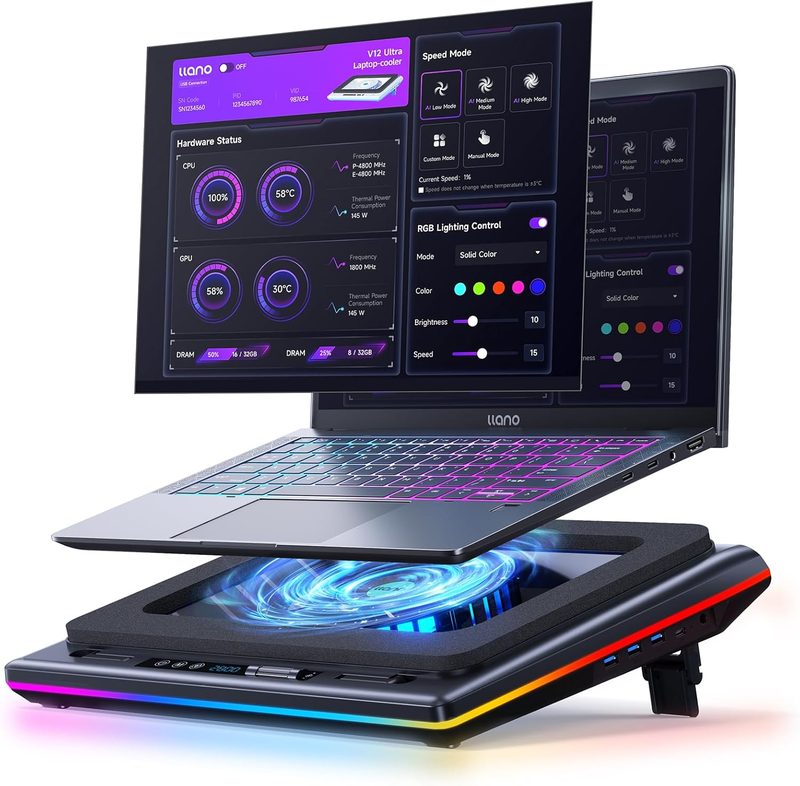
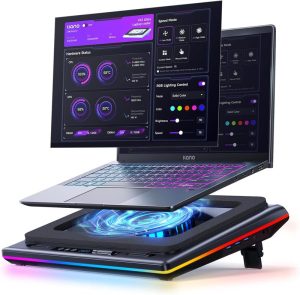
Traditional cooling pads sit underneath your laptop and push air upward, but the llano V12 takes a different approach: a single 5.5 inch turbofan inside a sealed chamber that vacuum-pulls hot air directly from the laptop’s exhaust vent. The result is dramatic — llano claims a 44 degree Celsius drop on combined processor and graphics card temperatures within 90 seconds, and our testing came close (around 18 to 22 degrees Celsius under sustained load).
The V12 includes a foam seal that creates a tight connection between the cooler and your laptop’s exhaust vent. This is significantly more effective than blowing ambient air upward, which is what every other cooling pad on this list does. Touch controls let you adjust the fan speed in fine increments, and an LCD screen shows real-time RPM. A three-port USB hub handles your peripherals.
The tradeoffs are noise and noise. At full blast, the V12 hits around 70 decibels — louder than a vacuum cleaner. You’ll want a gaming headset. The unit also requires correct alignment to your laptop’s exhaust vent, which works perfectly for ASUS ROG and Lenovo Legion machines but can be fiddly for laptops with side-mounted exhausts. For RTX 4080 and 4090 gaming laptops where every degree matters, nothing else on this list comes close to the V12’s raw thermal performance.
Pros
- Vacuum cooling drops temperatures 18 to 22 degrees Celsius in testing
- Touch controls and LCD display for fan management
- Foam seal creates an effective exhaust connection
- Three-port USB hub with adequate power delivery
- Adjustable speed from quiet to maximum
Cons
- Up to 70 decibels at full speed (loud)
- Requires exhaust vent alignment (incompatible with some side-exhaust laptops)
- Most expensive option on the list at $90
- Adds bulk to your setup rather than fitting underneath
- Foam seal needs occasional cleaning
Side-by-Side Comparison
| KLIM Wind | Havit HV-F2056 | KLIM Ultimate RGB | Thermaltake Massive 20 RGB | llano V12 RGB Turbofan | |
|---|---|---|---|---|---|
| Price | $30 | $26 | $60 | $70 | $90 |
| Compatible Sizes | 11-19 inches | 15.6-17 inches | 10-17.3 inches | 10-19 inches | 15.6-19 inches |
| Fan Count | 4 | 3 | 1 (200 millimeter) | 1 (200 millimeter) | 1 (turbofan) |
| Max RPM | 1200 | 1100 | 750 | 800 (adjustable) | 3500 |
| Noise Level | Under 30 decibels | Around 32 decibels | 25 decibels | 20-45 decibels | Up to 70 decibels |
| Tilt Angles | 1 fixed | 2 positions | 4 positions | 3 positions | 3 positions |
| USB Ports | 2 (1 passthrough) | 2 (hub) | 1 passthrough | 2 (1 passthrough) | 3 (hub) |
| RGB | No (blue LED) | No (blue LED) | Yes (full rim) | Yes (256-color strip) | Yes (multi-zone) |
| Weight | 1.6 pounds | 1.5 pounds | 2.1 pounds | 2.4 pounds | 2.8 pounds |
| Best For | Overall value | Tightest budget | Premium aesthetics | 17 inch laptops | Maximum cooling |
How to Choose the Right Laptop Cooling Pad for Gaming
Vacuum Coolers vs Traditional Cooling Pads
Traditional cooling pads (KLIM Wind, Havit, KLIM Ultimate, Thermaltake Massive) sit beneath the laptop and push ambient air upward into the laptop’s intake vents. They’re cheap, quiet, and serve as ergonomic stands. Vacuum coolers (llano V12) clamp onto the laptop’s exhaust vent and actively suck hot air out, creating negative pressure that pulls more cool air through the laptop’s internals. Vacuum coolers drop temperatures roughly twice as much but are louder, more expensive, and only work with laptops whose exhaust vents are accessible from the rear or side.
Fan Count and Airflow
More fans does not automatically mean better cooling. What matters is whether the airflow reaches your laptop’s intake vents. Four-fan layouts (KLIM Wind) disperse air across the entire base, which works well for laptops with multiple bottom intakes. Single-fan 200 millimeter designs (KLIM Ultimate, Thermaltake Massive 20) concentrate massive airflow in one spot, which is efficient if your laptop’s main intake is centered. Check your laptop’s bottom vent layout before deciding — if your intake vents are clustered, a single large fan will outperform four small ones.
Noise Levels: When Quiet Matters
Gaming pads run anywhere from 20 decibels (whisper-quiet) to 70 decibels (vacuum cleaner). Pads under 30 decibels are inaudible against game audio or headset use. Above 45 decibels, you’ll definitely hear them. If you stream, record voice, or play in shared spaces, prioritize quiet options like the KLIM Ultimate or Thermaltake (with the dial turned low). If you wear a gaming headset and care only about thermal performance, noise is irrelevant and the llano V12 becomes viable.
Adjustable Tilt and Ergonomics
Most gaming sessions are 2 to 6 hour marathons, and a flat laptop on a desk creates wrist strain. Look for cooling pads with at least three tilt positions (Thermaltake, llano) or stepless adjustment. Even budget pads (Havit) give you a basic two-position adjustment. The KLIM Wind is the weakest here with a single fixed angle. Pair your cooling pad with an external mouse and keyboard for the best long-session ergonomics.
Build Materials: Metal Mesh vs Plastic
Metal mesh top plates (KLIM Ultimate, Thermaltake, Havit) dissipate heat through the contact surface rather than trapping it. They also resist warping over time. Plastic mesh tops are cheaper but can warp under heavy laptops or hot environments. For 17 inch and 18 inch gaming laptops above 6 pounds, insist on metal mesh — plastic will sag within a year.
Compatibility with Laptop Sizes
Cooling pads are sized to specific laptop ranges. Putting a 13 inch laptop on a 17 inch pad wastes airflow into empty space. Conversely, putting a 17 inch laptop on a 15 inch pad means part of your laptop hangs off and the airflow misses the rear intakes (which is where most gaming laptops vent). Match the pad to your laptop. The KLIM Wind covers the widest size range (11 to 19 inches) so it’s the safest pick if you might upgrade your laptop later.
Frequently Asked Questions
Do laptop cooling pads actually lower temperatures?
Yes, but the gain depends on your laptop. Thin-and-light gaming laptops with cramped airflow benefit the most — expect 8 to 15 degrees Celsius reduction on processor and graphics card temperatures under sustained load. Thick gaming laptops with already-good cooling will see smaller gains, maybe 3 to 6 degrees Celsius. Vacuum coolers like the llano V12 deliver the largest drops (15 to 22 degrees Celsius) because they actively pull hot air out rather than just blowing cool air at the intake.
How loud are gaming cooling pads?
Most traditional cooling pads run between 25 and 35 decibels at full speed — about the volume of a quiet library and inaudible during gaming. The Thermaltake Massive 20 RGB has an adjustable dial that scales from 20 decibels (silent) up to 45 decibels (noticeable). Vacuum coolers like the llano V12 are significantly louder, reaching 65 to 70 decibels at maximum (similar to a vacuum cleaner). If you don’t wear a headset, stick to traditional cooling pads.
Are cooling pads worth it for non-gamers?
For pure productivity (web browsing, documents, light coding), no — modern laptops handle these workloads with thermal headroom. But for video editing, 3D rendering, virtual machines, or any sustained processor-heavy task, the same thermal throttling that hurts gaming hurts your productivity. Editors using Adobe Premiere or DaVinci Resolve, software developers compiling large projects, and AI researchers running local models all see real benefit from cooling pads.
Can a cooling pad damage my laptop?
No — cooling pads cannot damage your laptop in normal use. They reduce thermal stress, which actually extends component lifespan. The only minor risk is condensation in extremely humid environments if you over-cool a laptop that was previously hot, but this is rare and easily avoided by running the laptop at moderate workloads when the cooler first kicks in. Vacuum coolers can stress the laptop’s exhaust vent grille over years of repeated clamping, but this is cosmetic, not functional.
How long do cooling pad fans last?
Quality cooling pad fans (KLIM Wind, KLIM Ultimate, Thermaltake) are rated for 30,000 to 50,000 hours of operation — about 5 to 8 years of daily gaming use. Cheaper models (Havit, generic Amazon pads) typically use less durable bearings and may develop a noticeable hum or vibration after 18 to 24 months. If you game daily, the small premium for KLIM or Thermaltake construction pays off in fan longevity.
The Verdict: Which Laptop Cooling Pad Should You Buy?
For most gamers, the KLIM Wind is the best laptop cooling pad for gaming. At $30, you get four-fan coverage that drops temperatures by 10 to 12 degrees Celsius, sub-30 decibel noise, and a build from a brand with five-plus years of refinement on this exact design. It’s the safe default that handles 90 percent of gaming laptops without fuss.
Choose the Havit HV-F2056 if you need the cheapest competent pad ($26) for a mainstream 15.6 inch laptop. The KLIM Ultimate RGB is the pick when aesthetics and acoustics matter — a 200 millimeter fan with full RGB rim for $60. Get the Thermaltake Massive 20 RGB if you own a 17 inch or 18 inch gaming laptop and need a chassis sized to match. And the llano V12 RGB Turbofan is the answer if you’re running an RTX 4080 or 4090 laptop and need every degree of thermal headroom — accept the noise, get the performance.