
Driver Easy and IObit Driver Booster are the two best-known driver updaters for Windows. Both scan your PC for missing and outdated drivers, download the right versions from their own databases and install them with one click, with backups in case something goes wrong. Both had major releases in September 2026: Driver Booster 14 added a tool that fixes missing game DLLs, and Driver Easy 7.2 added driver recovery and rollback. They differ more than they first appear, though — most importantly, Driver Booster still has a free version and Driver Easy no longer does. Here is how they compare on drivers, features, price and trust.
Reviews Universe is reader-supported. When you buy through links on our site, we may earn an affiliate commission at no extra cost to you.
The Short Version
Choose Driver Booster if you want a free version, the lowest price and extra gaming tools, and you don’t mind IObit’s upsells.
Choose Driver Easy if you want a focused, upsell-free tool with a WHQL-only policy on Windows 10 and 11 and an offline scan for PCs with no network.
Our pick: Driver Booster for most home users, because the free version covers occasional updates and Pro costs less. Driver Easy is the cleaner choice for troubleshooting and for people who dislike aggressive marketing.
First: Do You Need a Driver Updater?
Windows Update installs drivers for most hardware automatically, and graphics card makers have their own update apps. A driver updater is most useful when Windows Update has missed something — an older printer, a network adapter after a clean install, chipset or audio drivers from a laptop maker that stopped publishing updates — or when you are troubleshooting crashes, sound problems or a dead Wi-Fi connection. Updating drivers that already work rarely makes a PC faster, and occasionally a new driver causes problems, which is why the backup and rollback features below matter.
Driver Easy vs Driver Booster at a Glance
| Driver Easy | Driver Booster | |
|---|---|---|
| Developer | Easeware Technology (operations in Shenzhen, China) | IObit (Hong Kong-registered company) |
| Latest version | 7.2.0 (September 2026) | 14.0.0 (September 16, 2026) |
| Driver database (vendor claim) | 30,000,000+ | 23,000,000+ (Pro) |
| Free version | No (scan only, 7-day trial) | Yes |
| One-click update all | Yes | Pro (Free updates manually) |
| Driver backup and restore | Yes, plus rollback | Automatic in Pro |
| Offline updating | Offline scan | Offline update (Pro) |
| Game tools | Game dependency scan, Game Boost | Game components, 680+ game DLL fixer, Game Ready drivers |
| Windows support | 11, 10, 8, 7 (x64 only) | 11, 10, 8.1, 8, 7, incl. ARM64 |
| Price, 1 PC | $29.95/year | $19.95/year |
| Price, 3 PCs | $29.95/year (promo; normally $59.90) | $22.95 (12 months + 6 free) |
| Money-back guarantee | 30 days | 60 days |
Driver Database and Driver Quality
Both companies quote enormous databases: Driver Easy says it has more than 30 million drivers and Driver Booster more than 23 million in its Pro edition, from over 1,200 brands including Intel, AMD and NVIDIA. Neither figure has been independently audited, and in practice both find the common drivers that matter.
The more important question is which drivers they install. Easeware says that on Windows 10 and 11, Driver Easy installs only drivers certified through Microsoft’s WHQL program, and it labels each driver as certified in the update list. IObit says each Driver Booster driver is verified in two steps, against Microsoft WHQL and with its own security scan, and the redesigned scan engine in version 14 shows both a “Latest” and a “Most Stable” version so you can choose the conservative option. Both create a Windows restore point before updating.
Driver Easy: Focused and Easy to Trust
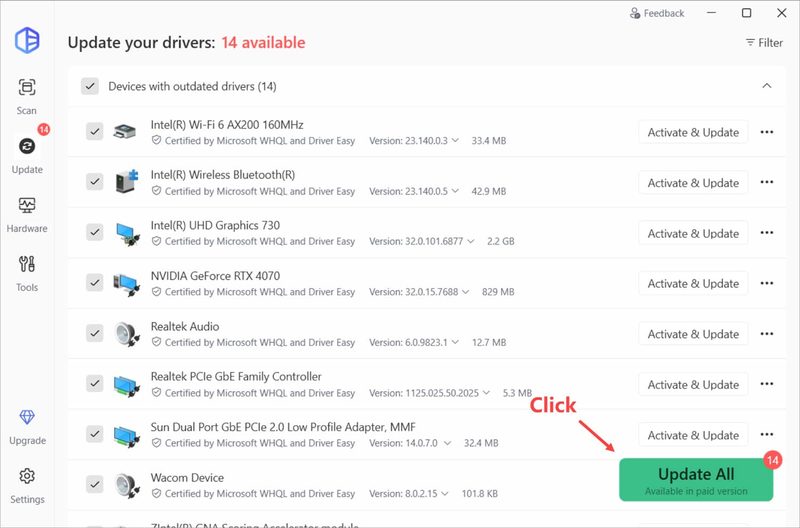
Driver Easy does one job and keeps the interface clean. A scan lists outdated drivers with their certification status; Update All downloads and installs them, or you can pick a specific version. Its standout feature for troubleshooting is the offline scan: if a fresh Windows install has no working network driver, Driver Easy scans the PC offline so you can download the right driver on another computer. Version 7.2.0 adds Driver Recovery, which backs up each driver before updating and lets you roll back, along with controls to stop updates in progress and a history that separates Driver Easy’s updates from other sources.
It also uninstalls drivers for removed devices, shows hardware information, scans for missing game components such as DirectX and Visual C++ runtimes, and includes free tech support from staff that include Microsoft Certified Professionals. Driver Easy has a 4.3 TrustScore on Trustpilot from more than 22,000 reviews.
The catch is the price model. Driver Easy dropped its free version in May 2024, so a free scan shows what needs updating, but installing requires the 7-day trial or a subscription. The trial converts to $39.95 a year unless you cancel, while buying directly costs $29.95 a year for one PC, so if you plan to keep it, buy rather than trial. It runs only on 64-bit x86 PCs — not on ARM laptops or Windows in S mode.
Pros
- WHQL-only drivers on Windows 10 and 11 (vendor policy)
- Offline scan for PCs with no network driver
- Driver Recovery with backup and rollback
- Clean interface with no cross-selling
- Free tech support included
Cons
- No free version since May 2024
- Trial renews at $39.95, above the direct price
- Subscription only
- No ARM or Windows S mode support
Driver Booster: More Features for Less
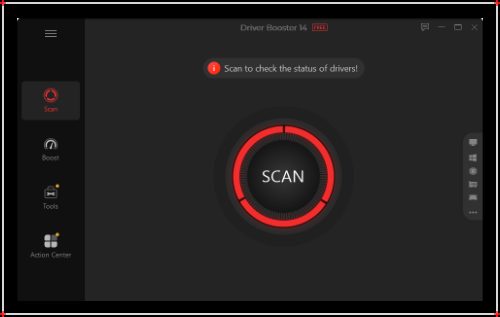
Driver Booster covers far more ground. Beyond drivers, it updates game components such as DirectX, Visual C++ redistributables, XAudio, OpenAL and PhysX, and version 14 adds a tool that detects and fixes more than 680 missing game DLLs across 60-plus components — a common cause of games refusing to launch. It updates NVIDIA, AMD and Intel Game Ready graphics drivers, includes fixes for no sound, network and device problems, and now supports Windows on ARM laptops.
The free version scans and lets you update drivers manually. Pro adds automatic download and installation, automatic driver backups, offline updating, repair of incompatible drivers that cause crashes, a larger driver database and priority support. Pro costs $19.95 a year for one PC, and the 3-PC plan was $22.95 for 18 months at the time of writing, with a 60-day money-back guarantee. TechRadar rated Driver Booster 4 to 4.5 out of 5, praising its price, database and backups.
The drawbacks are IObit’s. The program promotes other IObit software, the website relies on countdown sales and inflated “original” prices, and the company had public disputes with Malwarebytes in 2009 and 2017. Read every installer screen and decline offers you do not want.
Pros
- Free version for manual driver updates
- Cheapest Pro plans: $19.95/year for 1 PC
- Game DLL fixer and game component updates
- Latest or Most Stable version choice
- Supports Windows on ARM
- 60-day money-back guarantee
Cons
- Upsells other IObit products
- Aggressive, permanent-sale pricing pages
- Automatic updates and backups are Pro-only
- Company’s past disputes with Malwarebytes
Pricing Compared
Driver Booster is cheaper at every level: $19.95 a year for one PC against $29.95 for Driver Easy, and $22.95 for three PCs (covering 18 months) against Driver Easy’s $29.95 promotional 3-PC price, which is normally $59.90. Driver Booster also has a free tier, which Driver Easy lacks, and a longer refund window (60 days against 30). Both are subscriptions that renew automatically; neither sells a lifetime license. Prices for both change with promotions, so check the current offer on IObit and Driver Easy before buying.
Frequently Asked Questions
Is Driver Easy or Driver Booster better?
Driver Booster is better value for most home users: it has a free version, Pro costs $19.95 a year for one PC, and it adds gaming tools like a missing-DLL fixer. Driver Easy is the better choice if you want a focused tool without upselling, a WHQL-only policy on Windows 10 and 11, and an offline scan for PCs with no network driver.
Is Driver Easy still free?
No. Driver Easy stopped offering a free version in May 2024. Scanning is free, but installing drivers requires a 7-day trial or a paid plan, which costs $29.95 a year for one PC when bought directly. The trial renews at $39.95 a year if not cancelled.
Is Driver Booster free?
Yes. Driver Booster Free scans for outdated drivers and lets you update them manually, and it includes game component updates. Pro adds automatic installation, driver backups, offline updates and a larger database for $19.95 a year.
Are driver updaters safe?
Reputable driver updaters create a restore point and back up drivers before changing them, so a bad update can be undone. Both Driver Easy and Driver Booster do this. Windows Update and your PC or graphics card maker remain the safest sources, so use a driver updater mainly for drivers they miss or when troubleshooting a problem.
Will updating drivers make my PC faster?
Usually not noticeably. The exception is graphics drivers, where new versions can improve game performance. Driver updates are mainly for fixing problems such as crashes, missing sound, Wi-Fi drops and devices that are not recognized.
Who makes Driver Easy and Driver Booster?
Driver Easy is made by Easeware Technology Limited, which runs its operations and driver testing from Shenzhen, China. Driver Booster is made by IObit, whose products are sold through Both Talent International Limited, a company registered in Hong Kong.
Final Verdict
For most people, Driver Booster is the better buy. The free version handles occasional manual updates, Pro is cheaper than Driver Easy, and the game DLL fixer and component updates are genuinely useful for PC gamers. Just decline the extra IObit offers.
Choose Driver Easy if you value a clean, trustworthy experience over price. Its WHQL-only policy, offline scan and new Driver Recovery make it a strong troubleshooting tool, and it does not try to sell you anything else — just buy it directly rather than through the trial.
For more ways to keep a Windows PC running well, see our guide to the best PC optimizer software.